How to Make UGC That Actually Converts
How to make UGC that converts at 3X industry average. Scripts, filming setups & editing process used by top creators. Templates included →
Great User-Generated Content (UGC) comes down to a simple, powerful strategy: know your goal, write a killer brief for your creators, and always, always focus on authentic storytelling. It’s not about fancy equipment; it’s about giving real people the roadmap to share their experiences in a way that feels genuine and hits home.
Laying the Groundwork for High-Performing UGC
The UGC videos that look effortlessly spontaneous? I can almost guarantee you they’re the result of rock-solid planning. Before anyone even thinks about hitting "record," the foundation for a viral hit is built on a smart pre-production strategy. This is where you separate content that connects from content that just adds to the noise.
It all starts with one clear question: What are you trying to achieve? Are you aiming to drive sales for a new launch, build up social proof for a flagship product, or just get people talking about your brand? Your answer shapes every single decision that follows.
Define Your Campaign Goals
Without a clear goal, a UGC campaign is like a ship without a rudder. You have to define what success looks like before you even think about reaching out to creators.
- Driving Sales: If this is your target, your video angles need to be all about product benefits, satisfying unboxings, or classic problem-solution stories. The call-to-action needs to be direct and unmissable, like "Shop Now" or "Grab yours before it's gone."
- Building Trust: Here, authenticity is the name of the game. You're looking for honest customer testimonials, raw, unfiltered reviews, or "day in the life" videos where your product fits in naturally.
- Boosting Engagement: This is your chance to create something genuinely shareable. Think funny skits, mind-blowing hacks, or relatable moments that make people smash the like, comment, and share buttons.
This simple flow chart really nails how your goals, brief, and creative angles all need to line up for a cohesive strategy.
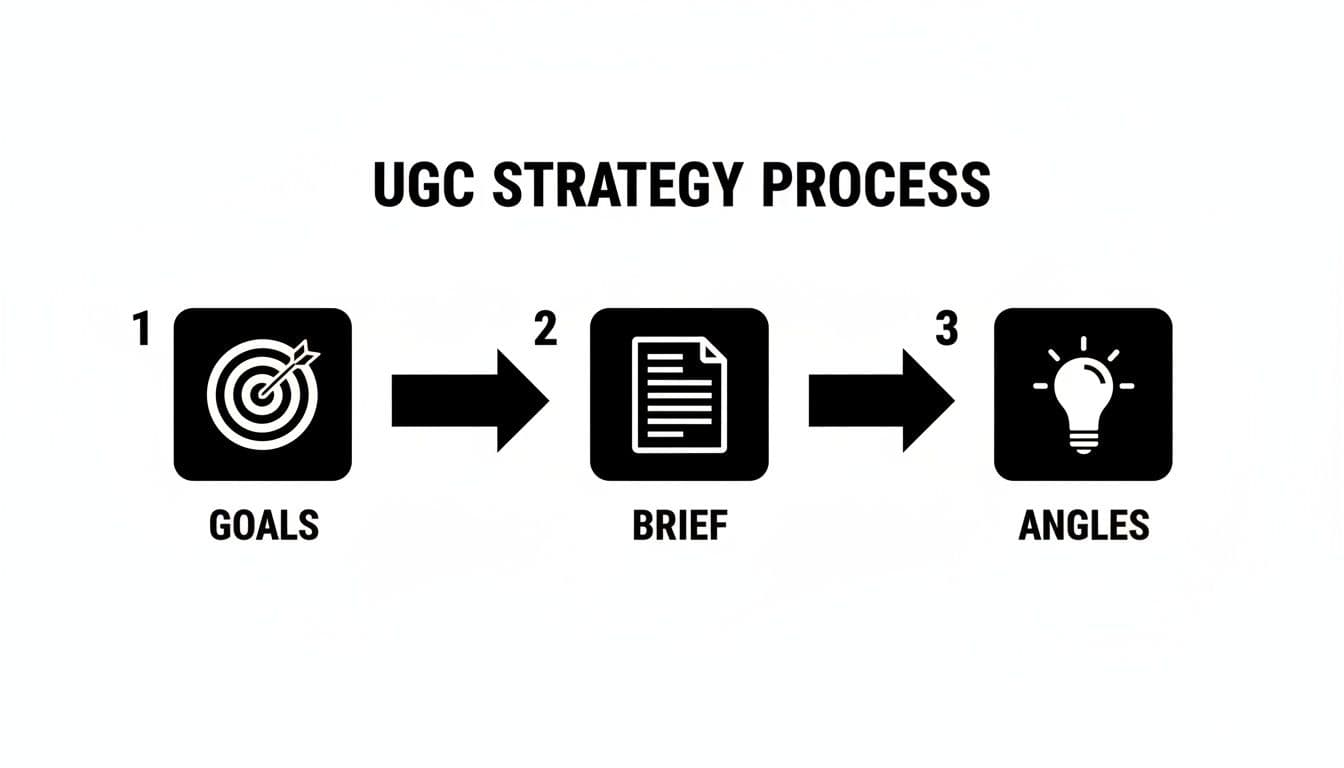
The takeaway here is that even the most creative ideas will fall flat if they aren't born from a specific, well-defined objective.
Develop a Clear Creative Brief
Your creative brief is your most valuable asset in this whole process. It’s not about micromanaging creators or killing their vibe. It’s about giving them guardrails that empower them to create amazing, on-brand content. A solid brief clearly outlines the target audience, the core message, the desired tone of voice, and any hard-and-fast do's and don'ts. For a great primer on the fundamentals that apply here, check out this guide on how to create social media content.
A well-crafted brief is the bridge between your brand's strategic goals and a creator's authentic voice. It ensures freedom within a framework, which is the secret to scalable, high-quality UGC.
If you’re looking for more inspiration on different content types, you can see a ton of effective UGC examples that show this in action. By nailing down the "why" behind your campaign from the very beginning, you make sure every single video has a clear purpose and a better shot at success.
Crafting Hooks That Stop the Scroll
In the world of social media, you have about three seconds to make an impression. Three seconds. That’s it. If you don't grab someone's attention instantly, they're gone—swiped away into the endless feed. This is why a powerful hook isn't just a "nice-to-have"; it's the single most important part of your UGC video.
Your goal is to forget generic, boring openers. Instead, you need to forge an immediate emotional connection, spark intense curiosity, or make a bold claim that forces people to stop and listen.

This isn’t just about being loud; it’s about being smart. The stakes are high because UGC posts already generate a massive 6.9 times more engagement than brand-produced content. A killer hook just pours gasoline on that fire. Just look at brands like Iconic London, who boosted conversions by 126% by getting this right.
The Psychology Behind Effective Hooks
The best hooks aren't random—they tap directly into human psychology. They work by either creating an "information gap" that your brain desperately wants to close or by poking at a pain point the viewer is dying to solve.
- Curiosity Hooks: These are all about making people wonder. Think about a line like, "This is the one cleaning hack I wish I knew sooner." You can't help but stick around to find out what it is.
- Problem/Agitation Hooks: These speak directly to a viewer's struggles. For example, "If your skin still looks dull after your skincare routine, you're missing this one step." This hits home for anyone who's been disappointed by their products.
- Benefit-Driven Hooks: This is where you lead with the juicy end result. A hook like, "How I got this perfect glow in under five minutes," is powerful because it promises a great outcome and a quick win.
The most effective UGC scripts feel like a conversation with a friend. They start with a hook that feels like a shared secret, move into the authentic story, and finish with a simple, helpful suggestion—not a hard sell.
Structuring Your UGC Script
Once your hook has done its job, the rest of the script needs to flow naturally. A great UGC video script is short, punchy, and stays on point.
If you’re ever staring at a blank page and drawing a blank, using a hook generator can be a fantastic way to get the creative juices flowing. It can give you a bunch of solid starting points to build from.
Here’s a simple four-part structure that just works:
- Irresistible Hook: Your scroll-stopping opening line. Make it count.
- Quick Value: Don't make them wait. Immediately deliver on the hook's promise. Show the hack, reveal the secret, or explain the solution right away.
- Authentic Experience: This is the heart of the video. The creator shares their personal story or shows the product being used in a real, relatable way.
- Low-Friction CTA: End with a simple, clear call to action that doesn't feel salesy. Ditch "Buy Now" for something softer, like "You have to check this out for yourself" or "Tap the link to see what I mean." This keeps the entire video feeling conversational and trustworthy.
To give you a head start, here are some proven formulas you can steal for your next video.
Scroll-Stopping Hook Formulas
This table gives you a few plug-and-play formulas to get you started. Mix and match them with your product's benefits to create something compelling.
| Formula Type | Example Hook |
|---|---|
| The "Mistake" Hook | "You're applying your sunscreen all wrong. Here's why." |
| The "Secret" Hook | "Here’s the secret to getting a flawless foundation base every time." |
| The "Comparison" Hook | "Stop using [Old Method] and start doing this instead." |
| The "Hype" Hook | "TikTok made me buy it, and I have zero regrets." |
| The "Problem/Solution" Hook | "If you struggle with frizzy hair, you need to see this." |
| The "Numbered List" Hook | "3 reasons why this is the only travel mug you'll ever need." |
Think of these as templates. The real magic happens when you adapt them to your specific product and audience, making them sound like they came from a real person, not a marketing department.
Mastering Production with Just Your Phone
You really don’t need a fancy film crew or a mountain of expensive gear to create killer UGC. Seriously. Some of the best-performing content I've seen was shot on the same device you’re probably holding right now. The real secret to making your smartphone footage look incredible isn’t the phone itself—it’s about nailing a few production basics.
It all starts with light. Good lighting is the single fastest way to level up your video quality, and the best kind is totally free. I'm talking about natural light from a window, which creates that soft, flattering look that professional studios spend thousands trying to replicate.
Just make sure you’re facing the window, letting the light hit your face. Never, ever have the window behind you, or you’ll end up as a dark, creepy silhouette. If you see some harsh shadows, grab a cheap piece of white poster board and hold it just out of frame to bounce some of that light back onto your face. It works wonders.
Framing and Composition Basics
How you frame yourself in the shot can instantly make your video feel more polished. Don't just point and shoot. Take a second to think about your composition. The easiest and most powerful trick in the book is the rule of thirds.
Imagine your screen has a 3x3 grid overlaid on it. The sweet spots—where a viewer's eye is naturally drawn—are where those lines cross. Instead of sticking your face dead center, try lining up your eyes with the top horizontal line. It’s a tiny shift that makes your shot feel way more dynamic and professional.
Go into your phone’s camera settings and turn on the grid overlay. It makes following the rule of thirds completely foolproof and will dramatically improve your framing from day one.
Ready to create video ads?
Turn your photos into scroll-stopping ads in minutes. No video editing skills required.
Try For FreeAchieving Crisp and Clear Audio
Let's be real: people will forgive a slightly grainy video, but they absolutely will not put up with bad audio. If your sound is muffled, echoey, or far away, viewers will scroll right past. Getting clean audio is non-negotiable for creating UGC that actually works.
Your first line of defense is the room you're in. Find a quiet space with plenty of soft surfaces—think carpets, curtains, couches, or even a closet full of clothes. These things absorb sound and kill echo. Stay away from big, empty rooms with tile floors and bare walls.
Even a small investment in an external microphone can make a world of difference.
- Lavalier Microphones: These are the little clip-on mics you can get for cheap online. They plug right into your phone and capture your voice perfectly while cutting out a ton of background noise.
- Quiet on Set: Before you hit record, do a quick sound check. Turn off the AC, the fan, the TV in the other room—anything that creates a low hum.
- Always Do a Test: Record a 10-second clip and listen back with headphones. You’d be surprised what you miss. This simple step can save you from having to re-shoot an entire video because of an audio issue.
Pro Tip: If you don't have an external mic, get your phone as close to you as possible without it looking weird. Filming in a smaller, quieter space also helps your phone's built-in mic perform way better. The goal is simple: make sure people can hear every word you're saying, loud and clear.
Editing Techniques for Pace and Engagement
Once you’ve got your footage, the real magic happens. Editing is where you stitch together all those raw clips and actually tell a story—one that’s fast, punchy, and keeps people from swiping away. On platforms like TikTok and Instagram, where attention spans are practically nonexistent, your editing style is just as critical as what you filmed.
The name of the game is making your video feel completely native to the feed. That means a rapid-fire pace and plenty of visual cues that make the content a breeze to follow, even with the sound off. Every single choice, from how long a clip lasts to the song you pick, directly impacts how well your video performs.
Drive Momentum with Quick Cuts and Dynamic Zooms
Long, boring shots are the fastest way to lose a viewer. The trick is to keep the screen alive with constant visual changes that hold their attention.
- Embrace Quick Cuts: Keep your clips incredibly short—think one or two seconds, max. Slicing quickly between different angles or steps in a process injects a shot of pure energy and speed. This works wonders for tutorials or before-and-after reveals.
- Use Dynamic Zooms: Don’t just let the camera sit there. A slow, subtle zoom-in or zoom-out can add a polished, professional feel to an otherwise static shot. It’s a simple move that keeps things from feeling flat.
- Leverage B-Roll: Weave in close-up shots of the product, different angles of the action, or even quick reaction shots. This breaks up the main footage and provides essential context without slowing things down.
These little tweaks are the difference between a video that gets watched and one that gets rewatched. The rhythm you build in the edit is what separates the good stuff from the great stuff.
Make Your Content Accessible and Engaging
Let's be real: a massive chunk of social media videos are watched on mute. Some studies show that number is as high as 85% on platforms like Facebook. That means your visuals have to do all the heavy lifting.
On-screen text and captions aren't just nice to have anymore; they're non-negotiable for both accessibility and engagement.
Your video absolutely must make sense with the sound off. If a viewer can't figure out your message without audio, you've already lost them. Use text overlays to hammer home key points, call out benefits, and walk the viewer through the story.
Most modern editing apps, like the ever-popular CapCut, have auto-captioning features that make this almost effortless. You can customize the font and color to vibe with your brand, but always, always prioritize readability. A clean, bold font with a subtle shadow or outline is almost always a safe bet.
Choosing the Right Audio
The final layer of your edit is the sound. The right song or trending audio can completely change the mood of your video and even give it a nice little boost in the algorithm.
- Trending Sounds: Hopping on a trending sound on TikTok or Instagram can be a shortcut to more views. Just make sure the audio actually fits the vibe of your content and your brand—don't force it.
- Brand-Aligned Music: If a trending sound feels off, just pick background music that matches the energy you're going for. Is it upbeat and fun? Calm and aesthetic? The music should be the supporting act, not the star of the show.
At the end of the day, you're trying to create a polished final video that feels both authentic and impossible to scroll past. By nailing the fast pace, adding clear visual messages, and topping it off with the right audio, you'll be cranking out UGC that stops the scroll and gets results.
Optimizing and Testing Your Content for Maximum Impact
Hitting “publish” on your UGC video isn’t the finish line—it’s the starting gun. Nailing the creative is only half the battle. The real magic happens when you start digging into the data, learning what resonates, and letting those insights fuel your next video.
This is where analytics become your secret weapon. Every single view, like, and share is a data point telling you a story about what your audience actually wants. Your job is to listen.
Fine-Tuning for Each Platform
One-size-fits-all content is a recipe for failure. A video that absolutely crushes it on TikTok might be a total dud on Instagram Reels or YouTube Shorts, even though they all seem pretty similar on the surface. Each platform has its own vibe, its own algorithm, and its own user culture. You have to play by their rules.
-
TikTok: Here, it’s all about speed and sound. Tapping into trending audio and popular meme formats is non-negotiable if you want to look native. Hashtags are also huge. Mix broad, high-volume tags (like #skincare) with more niche, community-focused ones (like #acnepositivity) to cast the widest net.
-
Instagram Reels: While trends definitely matter, the aesthetic is king. Clean editing, visually pleasing shots, and sharp, punchy captions tend to win the day. Sprinkling relevant keywords into your caption and on-screen text helps the algorithm figure out who to show your video to.
-
YouTube Shorts: This platform often favors content with a bit more substance—think quick tutorials, mini-vlogs, or those strangely satisfying process videos. A powerful, curiosity-piquing title is everything for grabbing eyeballs in the Shorts feed.
A/B Testing Your Creative Variables
Guessing what your audience wants is a great way to waste a lot of time and money. The only way to really know what works is to test. Everything. This is where A/B testing (or split testing) becomes your unfair advantage for making UGC that consistently hits the mark.
The idea is simple: you run two nearly identical versions of an ad, changing only one single element. This isolates that variable and tells you exactly what caused the shift in performance.
The goal of A/B testing isn't just to find a single "winner." It's to build a library of proven insights about your audience that you can apply to all future content, making your entire strategy smarter over time.
Start by testing the elements that will give you the biggest bang for your buck.
- Hooks: Pit a problem-focused hook ("Tired of frizzy hair?") against a benefit-focused one ("Get silky smooth hair in 3 steps").
- Calls-to-Action (CTAs): See what happens when you compare a direct CTA ("Shop the link in bio") with a softer, more intriguing one ("See what all the hype is about"). A killer CTA can dramatically lift your conversion rate, and if you're stuck, a solid CTA generator can be a great source of inspiration.
- Video Styles: Test a polished, aesthetic video against a raw, "shot-on-my-couch" version. You might be surprised which one your audience finds more authentic.
Measuring What Truly Matters
Vanity metrics like views and likes feel good, but they don't pay the bills. If you want to accurately measure your return on investment (ROI), you need to track the numbers that tie directly to your business goals.
The data is clear: authentic content works. In fact, UGC-based ads can achieve 4x higher click-through rates and slash cost-per-click in half simply because they build instant trust. For anyone selling online, learning to create videos for e-commerce that actually drive revenue is a game-changing skill. By tracking the right metrics, you can draw a straight line from your UGC efforts to your bottom line.
Common Questions About Making UGC
Jumping into UGC for the first time? You’ve probably got questions. Whether you're a brand trying to figure out how to scale your content or a creator who's just starting out, the details can feel a little murky.
Let's clear the air and tackle some of the most common questions head-on. Getting these fundamentals right is the key to creating UGC that's not just effective, but also sustainable and legally sound.
Do I Need Permission to Use Customer Content?
Yes. One hundred percent, yes. You absolutely must get explicit, written permission before using a customer's photo or video in your marketing. This isn't just good manners; it's a legal must-do that protects your brand and shows your community you respect them.
It doesn't have to be complicated. A simple DM or a quick email asking for their okay is usually all it takes. Just be super clear about where and how you're planning to feature their content. For bigger, more official campaigns, sending over a simple digital release form is the smart play.
Don't be hesitant to ask! Research shows around 72% of people are happy to say yes when a brand reaches out.
What Is the Ideal Length for a UGC Video?
This is the classic "it depends" answer, but for a good reason. The perfect length really comes down to the platform you're on and what you're trying to achieve. There's no single magic number, but here are some solid starting points.
- TikTok and Instagram Reels: Think fast. The sweet spot here is usually between 7-15 seconds. This is the prime length for grabbing attention and keeping it, which is exactly what the algorithms are looking for.
- YouTube Shorts: You can stretch it a bit more here, up to 60 seconds. But only go that long if you have a story that is genuinely engaging from the first second to the last.
- Paid Ads: When you're putting ad spend behind a video, shorter is almost always better. Your best bet is to test variations between 6 and 15 seconds. You have to land your message almost immediately.
Your own data is your best friend here. Dive into your audience retention graphs and see exactly where people are dropping off. That data will tell you everything you need to know about the perfect video length for your audience.
How Can I Encourage More Customers to Create UGC?
You can't just sit back and hope for the content to roll in. If you want a steady stream of authentic UGC, you have to get proactive and make it genuinely fun for your customers to join in.
One of the most powerful moves is running a giveaway or contest with a unique, branded hashtag. Offer up a prize that your audience will actually get excited about in exchange for the best video. This strategy doesn't just fill your content pipeline; it creates a massive amount of buzz and community engagement all at once.
Also, get in the habit of celebrating your customers. Regularly feature their content on your social channels—and always give them proper credit. This simple act of recognition is a huge motivator for others to share their own experiences. You can even add a small, friendly prompt on your product packaging asking customers to show off how they use your product in their daily lives. A specific ask is always more effective than a vague one.
Ready to create stunning, high-converting video ads in minutes? Proom AI turns your product photos into professional, share-ready videos with just a few clicks. Stop struggling with complex editing software and start generating high-impact UGC-style ads today. Try Proom AI for free!
Ready to create video ads?
Turn your photos into scroll-stopping ads in minutes. No video editing skills required.
Try For Free

