How to Make AI Videos That Convert and Drive Growth
How to make AI videos that convert: End-to-end guide from script to optimization. Best tools compared, quality tips & ad performance hacks →

Let's be honest. Creating a professional video used to be a massive headache. You'd spend a small fortune on equipment, hunt down a reliable crew, and then wait weeks for the final cut. That entire old-school model is completely broken for today's fast-moving marketing world.
This is why AI video generation isn't just a cool new trend—it's a fundamental shift in how we create.
The New Era of Video Creation: Why AI Is a Game Changer
AI flips the script entirely. It’s no longer about overcoming technical hurdles; it’s about moving at the speed of your ideas. The core advantages are impossible to ignore: blistering speed, effortless scale, and a dramatic drop in costs.
This change levels the playing field, giving small businesses and nimble marketing teams the power to compete with big-budget productions.
Unlocking Unprecedented Speed and Scale
Think about an e-commerce brand that needs to launch ads for a flash sale happening tomorrow. With the old process? Forget it. You'd be lucky to get a quote back in 24 hours.
Using an AI tool like Proom AI, that same team can take their existing product photos and spin up a dozen different video ad variations in under an hour. That's not just fast—it's agile. It's the ability to react to a market trend today, not next month.
This speed is what makes true scalability possible. A real estate agent, for instance, can now create slick, professional property tours for every single listing in their portfolio without ever booking a film crew. What once took weeks of scheduling and shooting can now be knocked out in a single afternoon.
Video goes from being a rare, high-effort project to a repeatable part of your daily marketing engine.
The real magic of AI video is how it vaporizes production bottlenecks. It frees you up to think like a marketer again—focusing on strategy and results instead of getting lost in the weeds of technical production.
The numbers back this up. The global AI video market has already hit USD 11.2 billion and is rocketing towards an estimated USD 246.03 billion by 2034. That's a staggering annual growth rate of 36.2%. This isn't just hype; it's a massive wave of businesses realizing they need faster, more affordable video to stay relevant. You can discover more insights about this growing AI video market and its trajectory.
From Technical Hurdles to Creative Freedom
At the end of the day, learning how to make AI videos is about getting your time and creative energy back. You can finally stop worrying about logistics and start testing what actually works.
Want to try five different hooks? Two different calls-to-action? A completely different visual style? Go for it. With AI, you can run these experiments without betting the entire marketing budget on a single video shoot.
Here’s a quick look at how the two worlds compare.
Traditional Video Production vs AI Video Generation at a Glance
This table breaks down the fundamental differences between the old way and the new, highlighting why so many are making the switch.
| Factor | Traditional Video Production | AI Video Generation (with Proom AI) |
|---|---|---|
| Cost | High upfront investment (thousands of dollars per video is common) | Low cost per video, often based on a subscription or credits |
| Time | Weeks or months from concept to final delivery | Minutes or hours from idea to finished video |
| Team Required | Specialized crew: videographers, editors, sound designers, actors | One person (marketer, designer, business owner) can manage it all |
| Scalability | Difficult and expensive to scale; each new video is a major project | Extremely scalable; create dozens of variations in a single session |
| Flexibility | Re-edits and changes are slow and costly | A/B testing and revisions are fast and nearly free |
The takeaway is clear. AI video isn't just a cheaper alternative; it's a more strategic one. It gives you the freedom to produce more content, test more ideas, and find out what truly connects with your audience.
The rest of this guide will walk you through the practical steps to make it happen, from planning your first video to measuring its impact.
Laying the Groundwork for a Killer AI Video
Jumping straight into an AI video generator without a solid plan is a recipe for a video that goes nowhere. It’s like trying to build a house without a blueprint—you might end up with something, but it probably won’t be what you wanted. Before you upload a single image, you need a strategy. This is what separates a video that gets ignored from one that actually drives results.
The whole process kicks off with one simple question: What am I trying to achieve with this video? A vague idea isn't a goal. A real goal is something you can measure. Are you aiming for direct clicks to a new product page? Trying to build brand awareness with a clip that feels shareable? Or is the plan to capture email sign-ups for an upcoming webinar?
Defining that objective is the single most important thing you'll do. It dictates every other decision, from the script you write to the call-to-action you choose.
Figure Out Your Audience and Platform
Once you know your goal, you need to think about who you’re talking to. A video targeting busy real estate investors on LinkedIn needs to sound professional and be packed with data. On the other hand, if you're trying to reach fashion-forward Gen Z shoppers on TikTok, you need a fast-paced, trendy video that grabs their attention in the first two seconds.
The platform is just as important as the audience because it sets the rules for the format.
- TikTok & Instagram Reels: These platforms demand punchy, high-energy videos, usually under 30 seconds. The hook has to be instant and highly visual.
- Facebook & Instagram Feed: Here you’ve got a bit more breathing room for longer, story-driven content. You have a chance to explain your value.
- LinkedIn: This is the place for professional, informative content that shows off your expertise or offers a clear business solution.
So many people make the mistake of creating a one-size-fits-all video. It never works. You have to tailor your message, your pacing, and your style to fit the environment where your audience will actually see it.
Write a Script That Drives Action, Not Just Views
With your goal, audience, and platform nailed down, it’s script time. A strong script is the backbone of your entire video, and it usually follows a simple but incredibly effective structure. And hey, you can even use AI tools to help you generate compelling copy. For a deeper dive, check out our guide on how to write a great script for an advertisement.
A rock-solid AI video script needs these three things:
- The Hook: You have less than three seconds to stop someone from scrolling. That first line or visual has to be magnetic. It could be a sharp question, a surprising stat, or something that speaks directly to a viewer's biggest problem.
- The Value: This is the meat of your message. Get straight to the point and explain what you offer and why it matters. Focus on the benefit for the viewer, not just a list of features.
- The Call-to-Action (CTA): Tell people exactly what you want them to do next. Don't be shy. Instead of something weak like "Check us out," use a direct command like "Shop Now," "Download the Free Guide," or "Book Your Demo Today."
Pro Tip: Keep your script incredibly lean. For a 15-second ad, you shouldn't be using more than 35-40 words. Every single word has to justify its existence to keep the video punchy and clear.
Let's say you're creating a 15-second ad for a new project management tool aimed at small business owners.
A weak script would sound like this: "Our new software helps you manage tasks. It has many features. Visit our website." It's boring and forgettable.
A strong script cuts right to the chase:
- (Hook): Tired of tracking projects in messy spreadsheets?
- (Value): Our tool organizes everything in one place, saving you five hours a week.
- (CTA): Get your free trial at [website]. Link in bio!
See the difference? This focused approach turns a simple idea into a strategic asset built for real impact.
Here is the rewritten section, crafted to sound human-written and natural, following all the provided guidelines and examples.
Bringing Your Vision to Life with Proom AI
Alright, this is where the magic happens. All that strategic planning—your script, your audience, your goals—is about to become a real, high-impact video. Stepping into the Proom AI platform feels less like using software and more like walking into a creative workshop. Your script and images are the raw materials, and the platform gives you the tools to shape them into something polished and professional. The whole process is designed to be intuitive, guiding you from concept to creation in just a few logical steps.
Your journey starts with picking the right foundation for your video: the template. This isn't just an aesthetic choice; it’s a strategic one. You're aligning the visual flow with your campaign's ultimate goal from the very beginning.
Choosing the Right Template for Your Goal
Think of a template as a pre-built narrative structure, not just a design. A template built for a flash sale in e-commerce will have quick cuts and bold text overlays to build urgency. On the other hand, a template designed for a real estate showcase will feature slower, more elegant transitions to give off a feeling of luxury and space.
Proom AI has a whole library of industry-tailored options for this exact reason. Don't just grab one that looks cool—pick the one that feels like it was custom-built for your objective.
- Driving Sales? Look for templates with big, bold placeholders for product shots and text that’s clearly centered for your Call-to-Action. These are built from the ground up for conversion.
- Building Brand Awareness? Go for the more cinematic, story-driven templates. They let your visuals breathe and help you build that crucial emotional connection.
- Showing Off a Property? Select templates with smooth, panning transitions. They mimic the feeling of walking through a space, which is perfect for interior design portfolios and real estate tours.
Making the right call here saves a massive amount of editing time later. It means the pacing and visual rhythm of your video are already optimized for your marketing goal before you even upload a single image. This is a core part of learning how to make AI videos that actually perform.
Ready to create video ads?
Turn your photos into scroll-stopping ads in minutes. No video editing skills required.
Try For FreeUploading and Sequencing Your Visual Assets
With your template locked in, it’s time to bring your visual assets into the mix. This isn't just about dumping a folder of images and hoping for the best. You're curating a visual story. The order you arrange your photos in literally dictates the narrative flow of your video.
A common mistake I see is people uploading images randomly. Don't do it. Think like a storyteller. Your first image needs to connect directly with your script's hook to grab attention immediately. From there, each image should build on that initial promise, showcasing different angles, features, or benefits of whatever you're selling.
Key Insight: The best AI videos I’ve seen use images that feel cohesive. Even if they're from different shoots, they should share a similar color palette, lighting style, or mood. That consistency is what makes the AI-generated transitions feel seamless and professional instead of jarring.
All the planning you did earlier sets the stage for a smooth creation process, making sure your goals, audience, and script are all aligned.
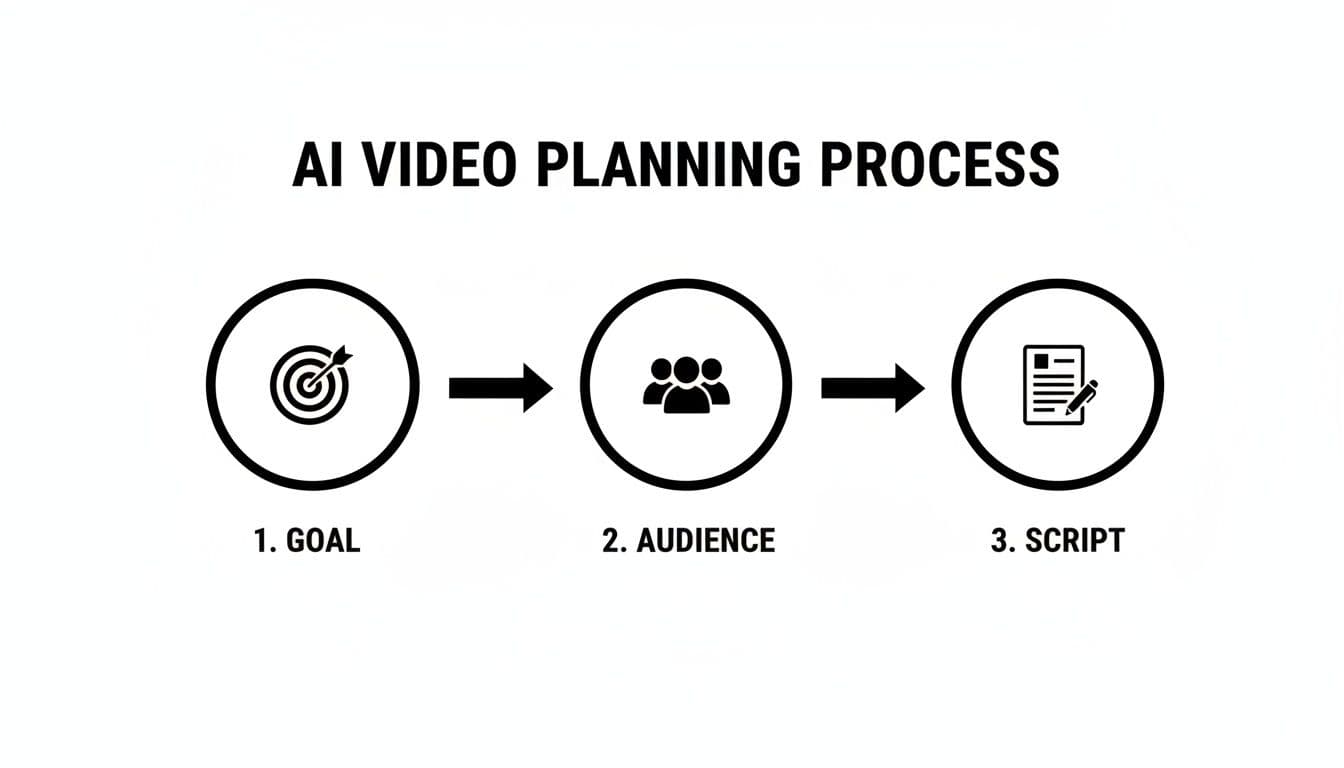
This visual flow really drives home the point that a great video is born from a clear strategy, long before you hit the "generate" button.
Customizing and Polishing Your AI Video
Once you’ve uploaded your assets and script, Proom AI will generate the first draft of your video. Now, the real artistry begins. This is where you transform the AI's output into a piece of content that is unmistakably yours. This customization phase is what elevates your project from a generic video into a branded, high-performance ad.
Polishing your video involves a few key tweaks that give it a professional, on-brand feel. If you want a broader look at what's out there, you might find it useful to check out our list of the best AI video generators for 2026 to see how different platforms handle customization.
Here are the critical elements to refine inside Proom AI:
- Edit Captions for Clarity: The AI will place your script on the video, but you should always give it a final review. Shorten sentences so they’re easy to read on screen, hunt for typos, and make sure the text timing lines up perfectly with the visuals.
- Adjust Text Styles: Brand consistency is non-negotiable. Tweak the fonts and colors of the text overlays to match your company's brand guidelines. It’s a small detail, but it makes the video feel like a natural part of your marketing ecosystem.
- Select Background Music: Music is what sets the emotional tone. Proom AI has a library of royalty-free tracks to choose from. Pick something that matches the energy you're going for—maybe something upbeat and punchy for a sale, or calm and sophisticated for a brand story.
- Choose the Right AI Presenter: The AI presenter or voiceover is literally the voice of your brand. Listen to a few different options and select one whose tone, accent, and language will click with your target audience. A warm, friendly voice might be perfect for a consumer product, while a more formal, authoritative tone could be better for a B2B service.
This level of control ensures the final video isn't just an "AI video"—it's your video. It reflects your brand's personality, speaks directly to your audience, and is fine-tuned to hit the specific goal you defined from the start. By working through these steps methodically, you can reliably pump out high-quality video content at a scale and speed that was pretty much unimaginable just a few years ago.
Go Beyond the Basics: Advanced Tactics for High-Performing AI Video Ads
Alright, you've got the hang of generating AI videos. Now it's time to find your edge. Making a solid video is one thing, but crafting an ad that actually stops the scroll and outperforms your competition? That's a different game entirely.
This is where you move past the default settings and start thinking like a strategist. We’re talking about building a unique brand presence, speaking to a global audience without draining your budget, and fine-tuning every single video for the platform it's destined for.
Create a Custom AI Influencer That Is Your Brand
One of the most powerful moves you can make is creating a custom AI influencer. Forget picking a stock presenter from a library. You can design a virtual persona that is 100% unique to your brand.
Think about that for a second. No competitor can copy it. It becomes a consistent, recognizable face for all of your marketing, building familiarity and trust with every ad you run.
This isn't just a cool feature; it's a strategic advantage. You can design your influencer to perfectly mirror your target customer's aesthetic—their style, their age, their entire vibe. That creates an immediate connection that generic presenters just can't replicate.
- Total Brand Alignment: Is your brand modern and sleek? Warm and approachable? Edgy and innovative? Design an influencer that embodies those core values.
- Unbreakable Consistency: Use the same presenter in every video ad to build a cohesive narrative and instant brand recognition over time.
- Influencer Power, AI Efficiency: You get the relatability and consistency of a human influencer without the sky-high costs, scheduling nightmares, or complex contracts.
You're essentially creating a proprietary brand asset that gets stronger with every video you publish. It's a next-level tactic for building a memorable, defensible brand in a ridiculously crowded market.
A custom AI influencer isn't a gimmick; it's a branding tool. It ensures your brand’s unique personality shines through, even when you're creating ads at lightning speed.
Go Global in Minutes with Multilingual Voiceovers
Another game-changer is using multilingual AI voiceovers. Imagine generating your video with a native-sounding voice in Spanish, French, German, or dozens of other languages. You can unlock international markets almost instantly.
The old way of doing this was a nightmare. It meant expensive reshoots, hiring multiple voice actors, and juggling complex production schedules.
With AI, the whole process is ridiculously simple. Take a single video project, clone it, and generate multiple versions with different language voiceovers in minutes. You can run targeted ad campaigns in different countries using the exact same visual assets you already created.
This is a massive opportunity for e-commerce brands looking to scale globally or software companies targeting a worldwide audience. It demolishes one of the biggest barriers to international expansion, making it both affordable and incredibly fast. It's a key part of learning how to create video ads that can perform on a global stage.
Stop Using a One-Size-Fits-All Approach
Finally, truly advanced marketers know that you can't just post the same video everywhere. An ad that crushes it on TikTok will almost certainly flop on Facebook. Every platform has its own unwritten rules, user expectations, and technical quirks.
Optimizing for each one is non-negotiable.
And this goes way beyond just changing the aspect ratio. You need to fine-tune multiple elements of your AI video to feel native to each platform's feed.
| Platform | Recommended Length | Key Optimization Tactics |
|---|---|---|
| Instagram Reels/TikTok | 7-15 seconds | Use fast cuts, big and bold captions that appear quickly, and an immediate, high-impact visual hook. Audio is everything, so pick a trending or energetic track. |
| Facebook/Instagram Feed | 15-45 seconds | You've got more room for storytelling. Slow the pace a bit, use clearer, more descriptive captions, and make sure your main point lands in the first 10 seconds. |
| YouTube Shorts | Under 60 seconds | Go for a vertical video with a strong story. Just like TikTok, a powerful hook is critical to stop people from swiping away instantly. |
When you tailor your AI videos for each channel, you dramatically increase their chances of connecting with the audience and driving real results. This isn't just posting an ad; it's creating a piece of content that feels like it belongs in the user's feed, which is how you boost engagement and, ultimately, your return on ad spend.
Getting Your Video Seen and Measuring What Matters
Hitting "download" on your finished AI video feels like crossing the finish line, but in reality, you've just completed the first leg of the race. The most important work is still ahead: getting that video in front of the right people and figuring out if it’s actually doing its job.
A brilliant video that nobody sees is just a file on your hard drive. Your distribution plan needs to be just as intentional as the creation process itself, starting with a simple question: where does your audience actually hang out online? From there, it's all about crafting the perfect ad copy and headlines that make them stop scrolling and pay attention.
Launching Your Video on Social Media
Before you even think about posting, put together a quick checklist. This isn’t about bureaucracy; it’s about making sure every video has the best possible chance to succeed on each platform. Blasting the same exact post everywhere is a recipe for mediocrity. You have to tailor the launch to fit the environment.
A solid launch plan should always include:
- Platform-Specific Copy: Write unique ad copy and headlines for each channel. The hook for your professional LinkedIn audience should be completely different from your casual, hashtag-driven Instagram caption.
- A/B Test Your Headlines: Never marry your first idea. Come up with two or three different headlines and let the audience tell you which one works best.
- A Crystal-Clear Call-to-Action (CTA): Your post copy needs to echo the CTA in your video. If the AI presenter says "Shop Now," your post text better have a direct link and repeat that exact instruction.
This turns your launch from a hopeful shot in the dark into a calculated marketing play.
Measuring What Truly Moves the Needle
Once your video is out in the wild, the data will start pouring in. It's incredibly tempting to get fixated on "vanity metrics" like the view count. Sure, a big number feels great, but it tells you almost nothing about whether the video is actually growing your business.
Instead, you need to laser-focus on the Key Performance Indicators (KPIs) that are directly tied to your bottom line. These are the metrics that prove your investment in AI video is actually paying off.
The goal isn't just to make AI videos; it's to make AI videos that deliver tangible business outcomes. Shifting your focus from views to conversions is the key to building a sustainable and profitable video strategy.
There's a reason the AI video generator market is exploding, projected to grow from USD 554.9 million in 2023 to a staggering USD 1,959.24 million by 2030. Businesses are flocking to tools like Proom AI because they can crank out video content for pennies per minute instead of thousands. This affordability unlocks the kind of rigorous A/B testing that was once a luxury reserved for massive brands. You can read the full research on this explosive market growth to see where things are headed.
Using Data to Refine Your Strategy
The real magic happens when you use your metrics to make smarter decisions for the next campaign. This is where the speed and low cost of AI video become your unfair advantage. You can run tests that would be completely unthinkable—and unaffordable—with traditional video production.
Here’s how you turn that data into action:
- Analyze the Right Metrics: Look at the KPIs that actually align with your original goal. If you wanted sign-ups, don't obsess over likes.
- Form a Hypothesis: Is your click-through rate (CTR) in the gutter? Maybe the hook in the first three seconds was weak. Are conversion rates low? Maybe your CTA was confusing.
- Run a Targeted A/B Test: Jump back into Proom AI and create a new version. But here's the key: change only one thing. Swap out the AI presenter, tweak the CTA text, or try a different background track.
- Measure and Repeat: Launch the new version and compare its performance to the original. The winner becomes your new control, and you start the process all over again.
This continuous feedback loop—create, measure, refine—is how you build a powerful video marketing engine. You’re no longer guessing what works; you're using real data to systematically improve your results over time.
Got Questions About Making AI Videos?
As you start exploring AI video, some questions will naturally pop up. Don't worry, that's completely normal. Most people wonder about the practical details like who owns the final video or if they need to be a tech wizard to make it work.
We've heard them all. This section tackles the most common questions head-on, giving you clear, simple answers so you can get back to creating with confidence.
Do I Own the Videos I Create with AI?
Yes, you absolutely do. This is a big one, and it's one of the best parts about using a platform like Proom AI. Once you generate a video, you get full commercial rights to it. It's yours.
That means you can run it as a paid ad, splash it across your social media, or feature it on your website's homepage without a second thought. There are no hidden licensing fees or weird usage rules that will sneak up on you later. The video is your asset, period.
For any business building a content library, this is a massive win. You can use, reuse, and remix your videos however your strategy changes, squeezing long-term value out of just a few minutes of work.
How Much Technical Skill Do I Need?
Honestly? Next to none. Modern AI video tools were made for marketers, entrepreneurs, and business owners—not professional video editors. The whole point is to make the process dead simple.
If you can handle these basic computer tasks, you're more than qualified:
- Clicking on a template you like.
- Uploading photos from your computer.
- Typing or pasting your script into a text box.
The AI does all the heavy lifting behind the scenes. It handles the complicated stuff like animating the camera, syncing the audio, and putting the final file together. Your job is to bring the creative vision; the platform takes care of the technical grunt work.
Can AI Videos Match My Brand Style?
Definitely. Keeping your brand consistent is key to building an audience that trusts you, and AI video tools are built with that in mind. You have full control over the visual and audio elements that make your brand feel like your brand.
Inside Proom AI, for example, you can tweak all the important components to match your brand guidelines perfectly. This makes sure every video you create feels like a genuine part of your marketing, not some generic, out-of-place ad.
Your brand's personality shouldn't get lost just because you're using AI. The goal is to use the technology as a tool to amplify your existing style, not replace it. Customization features are what make this possible, turning a generic template into a distinctly branded asset.
How Long Does It Really Take to Create a Video?
From the moment you log in to having a finished video ready for download, the entire process can be over in just a few minutes. Seriously. The actual AI generation part is lightning-fast, often taking less than a minute.
What usually takes the most time is your own creative process. You might spend an extra minute or two picking the perfect image to lead with or tweaking the last few words of your script to make it pop.
This incredible speed is one of the main reasons people are turning to AI video. It means you can jump on a trending topic with fresh content or test five different versions of an ad without waiting weeks for a production team.
Ready to turn your photos into high-performing video ads in just minutes? Proom AI gives you all the tools you need to create, customize, and scale your video content effortlessly. Start your free trial today and see how easy it is!
Ready to create video ads?
Turn your photos into scroll-stopping ads in minutes. No video editing skills required.
Try For Free

