How to Create Video Ads That Actually Convert
Learn how to create video ads that drive real results. This guide walks you through a practical process for planning, producing, and optimizing high-impact ads.
Crafting a video ad isn't just about stringing clips together. It’s a thoughtful process of defining your strategy, scripting a message that sticks, producing the video with tools you actually know how to use, and launching it where your audience lives. The real goal is to move beyond simple promotion and create something that builds genuine trust and drives action.
Why High-Performing Video Ads Are Essential for Growth
Before we get into the nitty-gritty of how to make a video ad, let's lock in the why. Video ads aren't just a nice-to-have anymore; they're a core engine for growth. Think about it. In a world jam-packed with static images and text, video is the one thing that cuts through the noise. It's the fastest way to build a real connection with someone.
What makes it so effective? Video combines visuals, sound, and story all at once. This multi-sensory punch lets you:
- Show, Don't Just Tell: You can demonstrate a product's value, explain a complex service, or show off your brand's personality in seconds flat.
- Build Instant Trust: There's an authenticity to seeing a product in action or hearing a real testimonial that a picture just can't match.
- Drive Decisive Action: A great video ad takes the viewer on a mini-journey that ends with a clear, compelling call-to-action—whether that’s a click, a sign-up, or a sale.
The Financial Impact of Video Advertising
The momentum behind video isn't just a hunch; the numbers tell the story. In the US alone, total digital video ad spend jumped 18% year-over-year to hit $64 billion, and it’s on track to top $72 billion. Globally, we're looking at a spend of over $190 billion, with social and streaming platforms gobbling up the biggest slice of the pie.
If you want to dig deeper, you can read more about these video ad spend trends to see where the market is headed. This growth, which is happening two to three times faster than overall media spending, is a massive signal that businesses are getting a serious return on their video ad investments.
To help you get started on the right foot, we've broken down the entire ad creation process into a simple, high-level roadmap.
The table below summarizes our core framework for creating a successful video ad. It gives you a quick snapshot of the journey before we dive into the details of each step.
The Video Ad Creation Framework
| Stage | Key Objective | Primary Output |
|---|---|---|
| Strategy | Define goals, target audience, and core message. | A detailed creative brief and a clear campaign plan. |
| Creation | Develop the script, storyboard, and produce the video assets. | A final, edited video ad ready for distribution. |
| Launch | Deploy the ad, monitor performance, and optimize based on data. | An active campaign with ongoing performance analysis. |
This framework provides a clear path forward, ensuring you're not just making a video, but building a strategic asset for your business.
This visual breaks down the core video ad creation framework into those three essential stages, taking you from the initial lightbulb moment all the way to launch day.
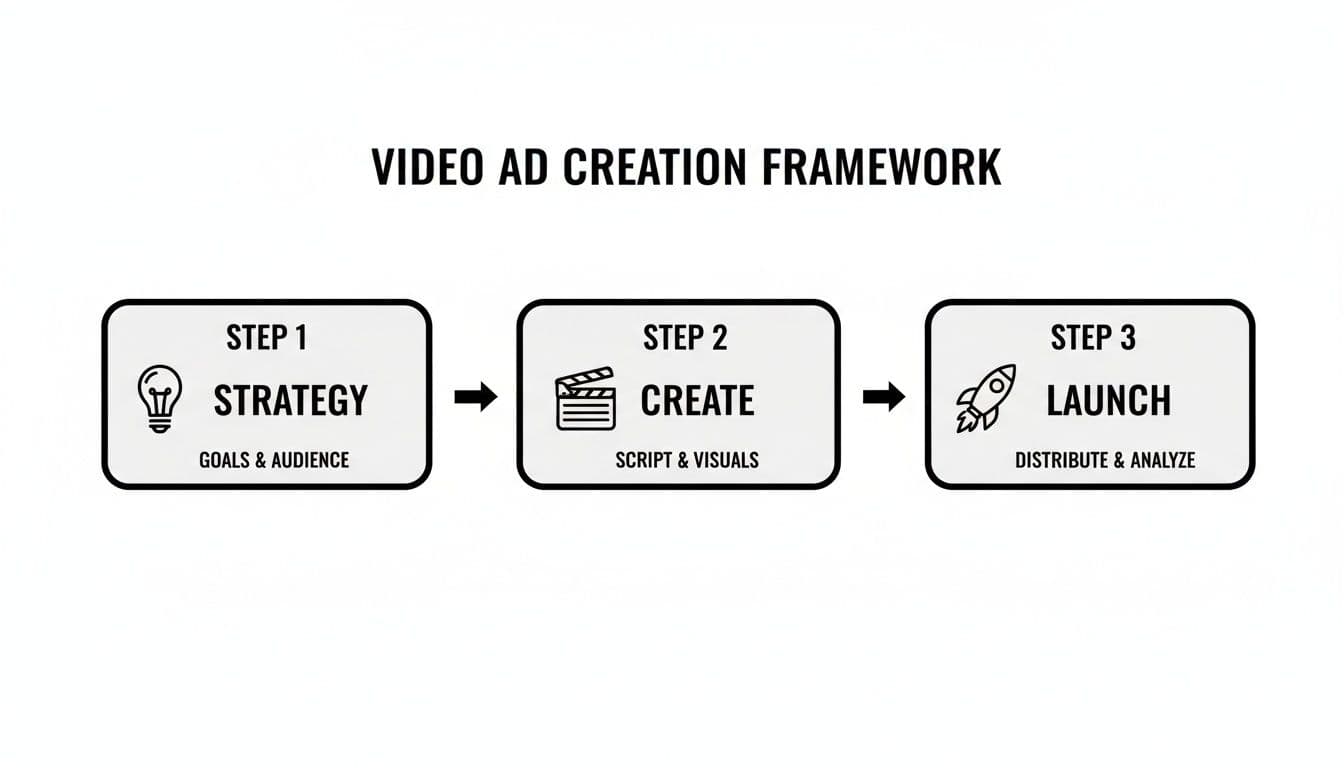
The key takeaway here is that a winning ad isn't just about slick production. It's about a balanced approach where your strategy, your creative, and your launch plan all get the attention they deserve.
Building Your Strategic Foundation Before You Hit Record
I've seen it a thousand times: someone gets excited about making a video ad, jumps straight into production, and ends up with a beautiful-looking video that does absolutely nothing for their bottom line. The best ads aren't just creative—they're built on a rock-solid strategic foundation.
Skipping this step is the fastest way to burn through your budget. Before you even think about templates or scripts, you have to define what a "win" actually looks like for you.
Every single element of your video, from the first frame to the final call-to-action, needs to serve one primary goal. Are you trying to get your brand name in front of new eyeballs? Capture email leads? Drive immediate sales? Pick one. Trying to do all three at once just creates noise.
An ad designed for brand awareness will feel completely different from one built for direct sales. The awareness ad might tell a story and aim for an emotional connection. The sales ad needs to be ruthlessly efficient: identify a problem, present your product as the instant solution, and ask for the sale.
Once you know what you want to achieve, you need to figure out who you're talking to.
Define Your Ideal Viewer
And I mean really define them. Going beyond basic demographics like age and location is non-negotiable. You need to get inside their head. What are the real, nagging problems they're dealing with? What keeps them up at night that your product can solve?
Let's get specific:
- You're a real estate agent: You aren't just targeting "homebuyers." You're targeting "first-time millennial homebuyers who are completely overwhelmed by bidding wars and terrified of making a catastrophic financial mistake." See the difference?
- You sell ergonomic chairs: Forget "office workers." Your real target is "remote professionals in their 30s who are starting to feel the aches and pains from their makeshift dining-table-desk and are finally ready to invest in their long-term health."
Getting this granular helps you craft a message that doesn't just sell—it resonates. It makes your audience feel like you truly get them.
Craft Your Core Message and Value Proposition
Okay, you've got your goal and your audience. Now, what's the one single idea you need to burn into their memory? That's your core message. It needs to be simple, powerful, and speak directly to the pain points you just identified.
Your unique value proposition (UVP) is the "why you" part of the equation. What makes you the obvious choice over everyone else? Maybe you're faster, more affordable, or have a feature nobody else can touch. Your ad has to scream this from the rooftops.
Think about it this way:
- Weak Message: "We sell high-quality office furniture." (So does everyone else.)
- Strong Message: "Stop letting back pain ruin your workday. Our chair is designed to help you feel as good at 5 PM as you do at 9 AM."
Laying this groundwork transforms your ad from a hopeful shot in the dark into a precision-guided tool for hitting a specific business goal. This is how you stop wasting ad spend and start creating videos that don't just get views—they get results.
Crafting a Compelling Script and Storyboard
Alright, you've got your strategy locked in. Now comes the fun part: turning those abstract goals into a real, tangible story. This is where you build the blueprint for your video ad, drafting a script and a storyboard that will guide you through the entire production process. Your story is the absolute core of the ad—without a solid one, even the most stunning visuals won't connect.

You’re fighting for attention in a crowded space, and you have a brutally short window to make an impression. Most viewers will decide whether to keep watching within the first three seconds. That’s it.
This means your script absolutely must open with a hook that stops the scroll cold. You could hit them with a surprising question, a bold claim, or a visual so striking they can't look away. If you're drawing a blank, a good video ad hook generator can be a lifesaver for brainstorming fresh angles that grab attention instantly.
Structuring Your Message for Maximum Impact
Once you’ve snagged their attention, you need to guide them on a journey from curiosity to action. Don't try to reinvent the wheel here; relying on proven storytelling frameworks is the smartest way to make sure your message lands.
Two of the most reliable frameworks I always come back to are:
- Problem-Agitate-Solve (PAS): Kick things off by tapping into a pain point your audience knows all too well. Next, agitate that problem by diving into the frustrations and annoyances it causes. Finally, you swoop in and present your product as the obvious, elegant solution.
- Attention-Interest-Desire-Action (AIDA): First, grab their Attention with that killer hook. Then, build Interest by showing off your product’s benefits. Create Desire by painting a picture of how much better their life will be with it. And finally, push them to Action with a crystal-clear call-to-action.
Whichever framework you choose, keep your language simple and conversational. Write like you're explaining it to a friend, not presenting to a corporate board.
Ready to create video ads?
Turn your photos into scroll-stopping ads in minutes. No video editing skills required.
Try For FreeVisualizing Your Story with a Storyboard
A script tells you what to say, but a storyboard shows you what the audience will actually see. This is just a sequence of simple sketches or images that maps out every single scene, shot by shot.
Seriously, it doesn't need to be a masterpiece—stick figures and basic shapes work just fine.
The whole point is to pair your visuals with your script, making sure every word is backed by a powerful image. This visual blueprint helps you nail down camera angles, text overlays, and transitions before you even think about production. It's your single best defense against ending up with a disjointed or confusing video.
Your storyboard is basically an insurance policy for a cohesive video. It forces you to think through the visual flow from start to finish, guaranteeing your message is clear and compelling. This one simple step can save you hours of painful re-editing down the line.
Thinking about the type of video you want to create is also part of this stage. A format that’s incredibly effective, especially for communicating value quickly, is the explainer video. There's a reason 73% of marketers use them—they’re fantastic at breaking down complex ideas and building the trust you need to make a sale. Mapping an explainer out in a storyboard ensures your explanation is perfectly paced and easy to follow.
To help you decide, here’s a quick breakdown of common video ad formats and what they’re best for.
Choosing the Right Video Ad Format for Your Goal
| Format Type | Best For | Key Consideration |
|---|---|---|
| Explainer Video | Simplifying complex products or services. Building trust through education. | Focus on clarity and a logical flow. Animation often works better than live-action for abstract concepts. |
| Product Demo | Showcasing specific features and functionality in action. | Keep it focused on the user's benefit, not just the feature itself. Show, don't just tell. |
| Testimonial/Case Study | Building social proof and credibility with real customer stories. | Authenticity is everything. Use real customers and unscripted (or lightly scripted) reactions. |
| Brand Story Video | Creating an emotional connection by sharing your company's mission or origin. | The goal is connection, not a hard sell. Storytelling and emotional appeal are paramount. |
| User-Generated Content (UGC) | Driving authentic engagement and relatability, especially on social media. | Feels more trustworthy and less like a traditional ad. Great for platforms like TikTok and Instagram. |
Choosing the right format early on will make your scripting and storyboarding process so much smoother. It gives you a clear container for your ideas and helps ensure the final product is perfectly suited for your audience and platform.
Producing Polished Ads with Accessible Tools
You’ve got a killer strategy and a compelling script locked down. Now for the fun part: bringing your video ad to life. The great news is you don’t need a Hollywood-sized budget or a team of professional editors to create something that looks fantastic and actually drives results.
Modern tools have completely leveled the playing field. This is where image-to-video generators and template-based editors absolutely shine. They cut through all the technical headaches, letting you focus on what really matters—your creative vision and your message.
With these tools, you can turn a simple folder of product photos into a dynamic, engaging video in minutes, not days. If you're just starting to explore your options, our guide on the best AI video generators for 2026 is a great place to see what the leading platforms can do.
The name of the game here is accessibility. The once-complex world of video production has been simplified into intuitive, drag-and-drop interfaces that empower marketers to create and ship content fast.
Selecting the Right Template and Visuals
First things first, you need to choose a template that actually fits your campaign goal. It's tempting to just pick one that looks cool, but you have to think about the story you’re trying to tell.
- For Brand Awareness: Look for templates with cinematic, flowing transitions and plenty of room for visuals that stir up some emotion.
- For Direct Sales: Go for fast-paced templates with bold text overlays and clear spots for your product to be the hero.
- For Social Media Feeds: Always prioritize vertical (9:16) templates built for mobile. Make sure key text is centered so it doesn’t get cut off by the platform’s interface.
Once your template is set, it’s all about the visuals. High-resolution images are non-negotiable. Blurry or poorly lit photos will instantly scream "low quality" and chip away at viewer trust.
Choose images that show your product from multiple angles, but more importantly, show it in a real-world context. This little trick helps your audience immediately visualize themselves using it.
Adding Text Overlays and Simple Animations
Let's be real: a huge chunk of social media video is watched with the sound off. That means your text overlays are doing some serious heavy lifting.
Keep your text short, punchy, and super easy to read on a small screen.
Your text should complement your visuals, not just describe them. If the image shows a happy customer using your product, the text should highlight a key benefit like "Effortless All-Day Comfort" instead of stating the obvious, like "Woman Using Our Product."
Use simple animations to guide the viewer's eye to what matters. A subtle slide-in for a headline or a fade-in for your call-to-action keeps things feeling dynamic without being distracting. The goal is to maintain momentum and move their attention smoothly from one point to the next.
Mastering Audio and Your Call-to-Action
Audio is that final layer of polish that ties everything together. When picking background music, find something that matches the mood of your ad but doesn’t overpower your message.
And for voiceovers? You don't need a professional studio. A quiet room and a decent USB microphone (or even just your smartphone) can deliver surprisingly clean audio. Just be sure to speak clearly and with some energy—your enthusiasm is contagious.
Finally, we arrive at the most important part of your entire ad: the call-to-action (CTA). It has to be crystal clear, direct, and compelling. Don't be vague. Instead of a weak "Learn More," try something more specific and benefit-driven, like "Get Your Free Quote" or "Shop the Summer Sale Now."
Make sure your CTA appears both visually on-screen and in your voiceover during the last few seconds of the ad. You want it to be impossible to miss.
Launching and Optimizing Your Ad for Maximum Impact
You've just created a fantastic video ad. That's a huge step, but the job isn't quite finished. Now comes the final, make-or-break phase: getting your masterpiece perfectly prepped for launch so it actually reaches the right people. Think of it as your pre-flight checklist before sending your ad out into the wild.
A sloppy export or a lazy setup can kill an otherwise brilliant ad before it even has a chance. Let's make sure every technical detail is dialed in for a smooth, professional playback experience every time.
Mastering Your Export Settings
First things first, let's talk specs. Before you even think about uploading, you need to double-check your video file's settings. Getting this right prevents frustrating upload errors and ensures your ad looks just as crisp on a phone as it did on your editing timeline.
Here’s a quick cheat sheet for the major platforms:
- Format: Stick with MP4 (H.264 codec). It’s the gold standard, giving you the best mix of high quality and a manageable file size. No exceptions here.
- Resolution: Always export at 1080p (1920x1080) for standard horizontal videos. If you're creating for TikTok or Instagram Stories, use the vertical equivalent. This hits the sweet spot for HD quality without creating a monster file that's slow to load.
- File Size: Aim to keep it under 250MB. While platforms like YouTube can handle bigger files, smaller sizes upload faster and get processed by ad systems more quickly. It’s all about creating a seamless user experience.
The Non-Negotiables of Ad Setup
With your perfectly exported video file in hand, it's time to build out the ad itself. This is way more than just hitting "publish." You need to craft the copy, thumbnail, and captions with the same level of care you put into the video.
Your thumbnail is your first—and maybe only—impression. It has to be a thumb-stopper. Pick a vibrant, clear frame from your video that sparks curiosity and tells people what they're about to see. Stay away from blurry shots or anything with tiny text that's impossible to read on a small screen.
Next up: captions. This is absolutely essential. A huge chunk of social media users watch videos with the sound off. If you don't have accurate captions, your message is lost on them. It’s that simple. Captions make your ad accessible and ensure your story lands, even in complete silence.
Remember, your ad copy and your video work as a team. The copy should complement the video's message, not just repeat it. Use it to provide extra context, highlight a key benefit, or add a sense of urgency to your offer.
Finally, you need a crystal-clear and compelling call-to-action that tells people exactly what to do next. If you're stuck, a reliable CTA generator can be a lifesaver, helping you write action-oriented prompts that drive clicks and conversions. It’s the final piece of the puzzle for setting your ad up for maximum impact.
Common Questions About Creating Video Ads
Even with the best plan in hand, diving into video ads for the first time usually brings up a few last-minute questions. It's totally normal. Let's walk through some of the most common things people ask so you can clear those final hurdles and get your campaign launched.
How Long Should My Video Ad Be?
I get this one all the time, and the honest answer is: it depends completely on the platform and your goal. There isn't a single magic number that works everywhere, but we have some really solid guidelines from experience that will put you in the right ballpark.
For social media feeds on platforms like Instagram or Facebook, you're fighting against the scroll. People are moving fast, so you have to be brief and punchy. Aim for 15-30 seconds—that’s usually enough time to grab attention, land your message, and get out. On TikTok, the sweet spot is even tighter, often somewhere between 9-15 seconds.
Now, YouTube pre-roll ads are a different beast. The ad itself can technically be longer, but those first five unskippable seconds are everything. You have to make them count. The goal is always to deliver your core value proposition before the viewer’s thumb even thinks about hitting that "Skip Ad" button.
Do I Need Expensive Equipment to Create Video Ads?
Not anymore. That’s one of the biggest myths holding people back. While a pro-level camera rig is nice to have, it’s far from a necessity for creating ads that actually work.
Your smartphone almost certainly shoots in high-quality 4K, which is more than enough for any digital ad platform. A great ad comes down to the fundamentals, not the brand of camera.
The real difference-makers are good lighting, clear audio, and a stable shot. With accessible image-to-video templates and the right tools, you can create polished, professional-looking ads without blowing a huge production budget. Your focus should always be on a strong script and a clear message—that's what converts, not expensive gear.
What Is the Most Important Metric to Track for Success?
This question brings us right back to the objective you set in the planning stage. The "most important" metric is simply the one that tells you whether you're hitting your goal. It's different for every campaign.
- Brand Awareness: If you just want people to know you exist, you’ll want to track Reach, Impressions, and View-Through Rate (VTR).
- Engagement: Trying to build a community? Then you should be looking at Comments, Shares, and Likes.
- Lead Generation or Sales: For campaigns designed to drive action, the numbers that matter are Click-Through Rate (CTR), Conversion Rate, and Cost Per Acquisition (CPA).
Don't get distracted by vanity metrics. Always tie your key performance indicators (KPIs) directly to the primary goal you set for the campaign from day one.
How Much Should I Spend on My First Campaign?
There's no universal starting number, but my advice is always the same: start with a small, manageable amount you’re comfortable testing with. You don't need to bet the farm on your first go.
A budget of just a few hundred dollars is often plenty to gather the initial data you need to see what’s working and what isn't.
Let your ad run for at least 3-5 days. This gives the platform's algorithm enough time to learn who your audience is and optimize delivery. Once that test is done, you can analyze the results, understand your cost per result, and then confidently scale your budget based on real performance data, not guesswork.
Ready to stop planning and start creating? With Proom AI, you can turn your existing images into stunning, professional video ads in just minutes. Choose a template, upload your photos, and let our AI handle the rest. Start your free trial and create your first video ad today.
Ready to create video ads?
Turn your photos into scroll-stopping ads in minutes. No video editing skills required.
Try For Free

