Video Production Software Comparison (2026)
Video production software comparison: AI vs traditional editors tested. Best tools for marketers ranked by speed, cost & output quality 2026 →
Picking the right video production software can feel like you’re stuck between two bad options: a beast of a program with a brutal learning curve, or a simple tool that hamstrings your creativity.
But the "best" tool isn't a one-size-fits-all solution. It always comes down to the job at hand. What you need to cut a feature film is worlds apart from what you need to crank out a high-converting social media ad in under five minutes. That’s why a direct video production software comparison is so important before you commit.
How to Choose the Right Video Production Software
This guide is designed to cut right through that noise. We're going to put traditional editing suites like Adobe Premiere Pro, built for frame-by-frame precision, head-to-head with modern AI-powered platforms like Proom AI, built for the sheer speed and efficiency modern marketing demands. My goal here is to give marketers, e-commerce brands, and small teams a clear framework for picking software based on what actually matters to the business.
Think of this comparison as a decision-making guide tailored to your operations. It’s all about aligning the software you choose with your team's real-world goals and resources.
Evaluating Key Decision Factors
Before we get into a feature-by-feature breakdown, it's worth understanding the high-level trade-offs you're making. For most marketing teams I work with, it boils down to these four things:
- Production Speed: How fast can you get from an idea (or a folder of assets) to a finished video?
- Ease of Use: What’s the real learning curve? Does it require a specialist, or can anyone on the team jump in?
- Cost-Effectiveness: What’s the total cost of ownership—not just the subscription, but the training and labor hours, too?
- Output Quality: Does the final video look professional enough for your brand and the channels you’re posting to?
In the world of video production, Adobe Premiere Pro is the undisputed giant, holding a massive 35% market share as of 2025 and leaving competitors like Final Cut Pro X and DaVinci Resolve in the dust. That dominance is built on a powerful professional toolkit that attracts enterprise users, who make up a staggering 67.4% of the market. For small businesses and marketers—the exact people using Proom AI for quick ad creatives—this means traditional tools are often over-engineered for their needs, demanding hours of manual editing and a steep learning curve. You can dig into more insights about video editing software market share to see the full picture.
Core Differences at a Glance
At its heart, the fundamental difference is control versus automation. Traditional software gives you granular control over every single frame. AI platforms, on the other hand, prioritize efficiency by automating all the tedious, repetitive tasks.
| Feature | Professional Suites (e.g., Premiere Pro) | AI Platforms (e.g., Proom AI) |
|---|---|---|
| Primary Goal | Cinematic control and custom projects | Speed, scale, and marketing efficiency |
| Workflow | Manual, timeline-based editing | Automated, template-driven generation |
| Ideal User | Dedicated video editor or creative professional | Marketer, designer, or small business owner |
| Time to Video | Hours or days | Minutes |
The right choice isn't about finding the "best" software overall, but the best software for the job at hand. For high-volume ad creation, speed and scalability often deliver a far greater ROI than microscopic creative control.
Before you can compare video production software, you need a mental map of the market. The tools available today aren't just slightly different flavors of the same thing. They fall into three distinct categories, each built to solve a completely different problem for creators and marketers. Getting this division right is the first step toward picking the right tool for the job.
First up are the Professional Desktop Suites. Think of the heavy hitters like Adobe Premiere Pro or DaVinci Resolve. These are the complex, timeline-based editors that give you painstaking manual control over every single frame, effect, and audio channel. They're the gold standard for high-end cinematic work where artistic precision is everything.
Cloud-Based Collaboration and AI Automation
Next, you have Cloud-Based Collaborative Editors. Platforms like Frame.io were built from the ground up to make team-based workflows less painful. Their real strength is in remote feedback, version control, and project management, which makes them indispensable for agencies and production houses where a dozen stakeholders need to review and sign off on content.
Finally, there’s the new and rapidly growing category of AI-Powered Instant Creators. Tools like Proom AI represent a totally different way of thinking about video. Instead of manual editing, they automate the entire creation process, turning assets like product photos or architectural renderings into professional video ads in just a few minutes. The focus here isn't granular control—it's speed, efficiency, and the ability to scale up performance marketing campaigns. Our detailed guide on the best AI video generators of 2026 dives much deeper into this space.
This AI-driven approach is tapping into a huge shift in the market.
The Software as a Service (SaaS) side of video production is exploding, valued at $2.49 billion in 2024 and projected to rocket to $5.26 billion by 2029. With cloud-based solutions already making up 72.8% of the market, it’s clear that accessible, collaborative, and fast tools are what people want.
This trend makes perfect sense. Modern marketing teams need to be agile and work together in real-time, especially with remote work being the new normal. You can read more about the video editing SaaS market's growth to see where things are headed.
To help clarify these distinctions, here’s a simple breakdown of the main software categories.
A High-Level Look at Video Software Categories
| Software Category | Ideal For | Key Strength | Typical Production Time |
|---|---|---|---|
| Professional Desktop Suites | Filmmakers, VFX artists, expert editors | Unmatched creative control, deep toolsets | Days to Weeks |
| Cloud-Based Editors | Agencies, remote teams, large productions | Seamless collaboration, version control | Hours to Days |
| AI-Powered Instant Creators | Marketers, small businesses, e-commerce | Speed, scalability, automated creation | Minutes |
This table shows how each category is tailored for different needs and timelines. The right choice depends entirely on your project's goals.
Matching the Tool to Your Goal
Knowing these categories helps you filter your options without wasting time. If you're shooting a documentary, a professional suite is non-negotiable. If you’re trying to manage a post-production team scattered across three time zones, a collaborative platform is your best friend.
But if your goal is to pump out dozens of high-quality social media ads from your e-commerce catalog every week, an AI-powered creator is the only tool that makes sense. This framework shifts the conversation from "which software is best?" to "which software category is right for my business?"
Before you dive into a direct feature-by-feature comparison, use this model to figure out which path aligns with your team’s actual needs, resources, and goals.
Feature and Workflow Analysis
Let's get down to brass tacks. A real video production software comparison means looking past the sales pitch and seeing how these tools actually behave when you're on a deadline. How do they feel to use? Here, we're pitting Proom AI against two very different beasts: the professional industry titan, Adobe Premiere Pro, and the design-for-everyone online tool, Canva.
We'll compare them based on what really matters to marketing teams: speed, how they use AI, and the quality of the final video. Each tool was built for a different job, and figuring out those core differences is the key to choosing the right one. This isn't about finding one "winner"—it's about finding the right tool for your specific project.
Speed and Ease of Use
The biggest gap between these platforms is the time and skill needed to get a finished video. For a fast-moving marketing department, this is often the deciding factor.
Adobe Premiere Pro is built around a classic, timeline-based editor. It gives you microscopic control over every single element, from frame-by-frame cuts to sophisticated color grading. But that power comes with a notoriously steep learning curve. You need to understand concepts like keyframes, codecs, and multi-track editing, which usually means hours of training or years of experience. A "simple" 30-second ad could easily take a skilled editor several hours from start to finish.
Canva makes things much simpler with its drag-and-drop interface and basic video templates. It's way more approachable than Premiere Pro, letting anyone stitch clips together, add text, and drop in simple animations. While it's definitely faster for basic projects, you're still manually arranging everything on a timeline, which gets old fast when you need to pump out multiple versions of the same ad.
Proom AI completely flips the script by getting rid of the timeline entirely. Its workflow is dead simple: pick a template, upload your images, and hit "generate." The whole creation process is automated. This shrinks video production time from hours down to just a few minutes. A marketer could create a dozen ad variations in the time it takes to build one in a traditional editor.
The trade-off is crystal clear. Premiere Pro gives you absolute creative control for custom, high-end projects. Canva is the friendly middle ground for simple, manual designs. Proom AI is all about speed and scale, automating the repetitive grunt work that eats up most of a marketer's time.
AI Capabilities and Automation
AI isn't just a buzzword anymore; it’s a real feature that makes a huge difference in your workflow. The way each platform integrates AI tells you everything you need to know about its philosophy.
Premiere Pro has folded in some smart AI features, like automatic transcription for captions and AI-powered color matching. These are impressive tools that help a professional editor work faster, but they're just assists. They speed up specific tasks within a manual workflow, not automate the entire thing.
Canva uses AI more as a starting point. Its "Magic Design" feature might suggest templates based on your media, which is helpful for getting started. But from there, you're back in the driver's seat, manually arranging scenes and syncing timing. The AI is more like a helpful intern than the project lead.
Proom AI, on the other hand, is built from the ground up on an AI engine. Its AI does way more than just assist:
- AI Scriptwriting: It generates hooks, calls-to-action, and entire scripts that fit the timing of the template.
- Automated Scene Generation: It analyzes your images and intelligently places them into scenes with the right motion and effects.
- AI Presenters and Voiceovers: It can create lifelike presenters with multilingual voiceovers, so you don't have to film anyone or hire voice actors.
- Custom AI Influencers: Brands can even design their own unique virtual presenters to match their aesthetic.
This deep integration means the AI handles both the creative and technical heavy lifting. All you have to do is focus on the inputs—your images and your core message.
Ready to create video ads?
Turn your photos into scroll-stopping ads in minutes. No video editing skills required.
Try For FreeTemplate Quality and Customization
Templates are the backbone of efficient video creation, but not all templates are created equal. For marketers, the quality and flexibility here are a massive deal in any video production software comparison.
Premiere Pro users typically buy templates from third-party sites like Envato Elements or Motion Array. These can look amazing, but you still have to manually swap out all the placeholder content, tweak the timing, and make sure everything fits. It’s a technical process that demands skill. You have infinite customization, but it's 100% manual.
Canva has a huge library of templates, but they often feel a bit generic, designed for broad social media posts. They’re a decent starting point for a simple story, but they often lack the polished, cinematic feel needed for a high-performance video ad. Customization is easy but limited—you can change colors and fonts, but the layout is pretty rigid.
Proom AI’s approach is far more specialized. It offers templates tailored to specific industries like real estate, interior design, and e-commerce. These aren't just visual styles; they're built on proven marketing formulas, with dynamic pacing designed to grab attention and drive action. Customization is focused on what matters for branding—captions, music, and presenter choice—while the cinematic structure is locked in to guarantee a high-quality video every time.
This shift toward specialized, easier tools is reflected across the market. While giants like Adobe Premiere Pro (35%) and Final Cut Pro X (25%) still own the professional space, niche tools like CapCut (4%) and Filmora (5%) are winning over social media marketers. This points to a massive trend: the number of premium software users is expected to jump 48%, from 43 million in 2023 to 63.59 million by 2030, largely thanks to the creator economy. You can dig deeper into the growth of video editing software users and other market trends.
Putting These Tools to the Test: Real-World Marketing Scenarios
A features list on a pricing page is one thing, but the real test of any video production software comparison is how it performs under pressure. How do these tools actually hold up when you're facing a real marketing task, a looming deadline, and a specific business goal?
To cut through the theory, let's walk through three common scenarios that marketing and creative teams face every day. This is where the right software choice can mean the difference between a winning campaign and a total flop.
We’re moving past abstract features to see how these platforms function in the trenches. Each scenario will end with a clear recommendation based on the team’s goals, their resources, and the skills they have on hand.
Scenario 1: Scaling E-commerce Ads
You're running an e-commerce brand and need to churn out dozens of unique video ads for social media every single week. Your main assets are a folder full of high-quality product photos from a recent shoot. The mission is simple: produce high volume at high speed with consistent branding to fuel A/B tests and keep your campaigns from going stale.
-
The Traditional Editor (Premiere Pro): This is a complete non-starter. Sure, a skilled editor could craft one gorgeous, custom ad, but it would take hours. Trying to scale that to 20+ unique videos a week is not just impractical—it's financially ruinous. The labor costs would be astronomical.
-
The Online Design Tool (Canva): Canva definitely offers a faster route. A marketer could grab a template and start dragging and dropping product photos. But the workflow is still incredibly repetitive. Every single variation requires manual tweaks, making it a mind-numbing task that simply doesn't scale.
-
The AI Creator (Proom AI): This is the exact problem Proom AI was built to solve. The marketer just picks a proven e-commerce ad template, uploads the whole batch of product photos, and lets the AI generate a ton of variations in minutes. The platform automatically handles the timing, motion, and effects, delivering professional results almost instantly.
Recommendation: For creating a high volume of ads from static images, Proom AI is the undisputed winner. Its automated workflow is designed from the ground up to fix the scalability problem that both traditional editors and manual online tools can't touch.
Scenario 2: The Real Estate Portfolio Showcase
A boutique real estate agency needs to create slick, professional property tour videos and agent showcases. Everything has to feel high-end and cinematic to attract wealthy clients. Their assets are professional photos and architectural renderings for each listing.
-
The Traditional Editor (Premiere Pro): A pro editor using Premiere Pro could absolutely produce a stunning, bespoke video. But the cost and turnaround time for every new property would be a major bottleneck, making it totally impractical for an agency with a constantly changing portfolio.
-
The Online Design Tool (Canva): While Canva is quick, its templates often feel a bit generic. They lack the sophisticated, dynamic punch needed for luxury real estate. The final video might look clean, but it probably won't scream "premium property."
-
The AI Creator (Proom AI): Proom AI's real estate templates are made for this. They use cinematic transitions and deliberate pacing that know how to highlight architectural details and build an aspirational mood. The agency can turn a folder of listing photos into a polished video tour that looks like it came from a high-end production house.
Whether you're in e-commerce or real estate, mastering visual storytelling is everything. To dig deeper, check out our guide on how to create video ads that actually turn viewers into customers.
Scenario 3: The Scrappy Startup Explainer Video
A lean startup's growth team needs an explainer video for their new landing page, and they need it yesterday. They have a tiny budget, no video editor on staff, and a hard deadline just a few days away. The goal is a clear, simple video that gets their value proposition across effectively.
-
The Traditional Editor (Premiere Pro): This option means hiring a freelance video editor, which would immediately blow their budget and timeline. The back-and-forth of storyboarding, editing, and revisions would take weeks, not days.
-
The Online Design Tool (Canva): The team could try to cobble something together themselves in Canva. It's doable, but it would eat up a ton of design time to make it look good. They'd be stuck manually animating elements and trying to sync a voiceover, which can get messy fast if you don't know what you're doing.
-
The AI Creator (Proom AI): This is the fast track. The team can use Proom AI's scriptwriting tool to draft a solid script, then pick a template and upload a few product screenshots. With the built-in AI presenter and voiceover features, they can generate a complete, professional-looking explainer video in less than an hour, no special skills required.
Recommendation: For startups and small teams that need fast, affordable, and professional-looking videos, Proom AI is the most efficient path forward. It completely removes the need for specialized skills or expensive freelancers, empowering the team to create exactly what they need, right now.
Calculating the True Cost and Return on Investment
A software’s price tag is only ever half the story. To really understand what you’re spending, you need to look at the Total Cost of Ownership (TCO), which wraps in all the hidden expenses like time, training, and extra resources.
Think about traditional editing suites like Adobe Premiere Pro. The monthly fee is just the entry ticket. The real costs pile up in the steep learning curve and the sheer manual labor required for every single project. A skilled editor can easily burn an entire day creating one polished 30-second video ad, and that time is expensive.
On top of that, these powerful programs are resource hogs. You can't just run them on any old laptop; you need a machine with a beefy graphics card and plenty of RAM. That’s an upfront hardware cost that can run into hundreds, if not thousands, of dollars.
Shifting to a Performance-Based Model
This is where AI-powered platforms like Proom AI flip the script. Instead of a flat fee for a tool you might only use occasionally, a credit-based system ties your costs directly to your output. For marketing teams whose video needs spike during a campaign and then go quiet, this model just makes more sense.
This pay-as-you-go approach cuts out the waste. You’re only spending when you’re actively producing videos, ensuring every dollar goes toward a tangible asset that can drive your business forward. It’s a model built for performance and scalability, not just access.
The real ROI from video software isn't just about the cost per video. It's about the speed and scale at which you can produce assets that actually get results. AI automation slashes labor costs, turning video production from a major budget item into a lean, efficient growth engine.
Hypothetical Cost Breakdown for 10 Video Ads
Let's put some numbers to this. Imagine your team needs to create 10 unique video ads for a new social media campaign. We'll compare the estimated total cost, factoring in both the software subscription and the critical cost of labor. You can get a feel for how a credit model works for different campaign sizes by checking out Proom AI’s flexible pricing plans.
Here’s a simplified look at how the costs might stack up.
| Tool Type | Subscription Cost (Monthly) | Estimated Labor Hours | Estimated Total Cost |
|---|---|---|---|
| Traditional Editor | $20 - $50 | 20-40 hours | $1,020 - $2,050 |
| Online Design Tool | $10 - $20 | 8-15 hours | $410 - $770 |
| Proom AI (AI Creator) | Varies (Credit-Based) | ~1 hour | $50 - $150 |
Labor costs are estimated at $50/hour. Total cost includes one month's subscription plus labor.
The numbers don't lie. The time and money required for traditional software are in a completely different league. For any marketing team focused on efficiency and scaling their creative output without bloating their budget, the ROI from AI-driven automation is impossible to ignore.
Making the Final Decision for Your Team
This entire video production software comparison really boils down to one simple question: what’s your primary goal? There’s no single "best" tool out there—just the right tool for the job at hand. The secret is matching a platform’s core strength to your team’s most urgent need.
Your choice ultimately comes down to a classic trade-off: creative control versus speed.
If your team needs absolute cinematic precision for custom projects and you have dedicated video editors on staff, a professional suite like Adobe Premiere Pro is the obvious move. Its massive toolset gives you unparalleled control over every single frame.
On the other hand, if your biggest headache is managing remote teamwork and wrangling feedback from multiple stakeholders, a cloud-based editor will solve those workflow nightmares. Those platforms are built from the ground up for version control and clear communication.
Aligning Software with Your Marketing Goals
For marketers focused on performance and scale, the decision gets even clearer. If your main objective is to rapidly turn existing assets—like product photos or real estate images—into a high volume of quality video ads, then an AI-powered creator like Proom AI is the most direct path forward. It automates all the heavy lifting, turning production from a bottleneck into a real growth driver.
This flowchart helps visualize that decision-making process, pitting the need for scale against the need for granular control.
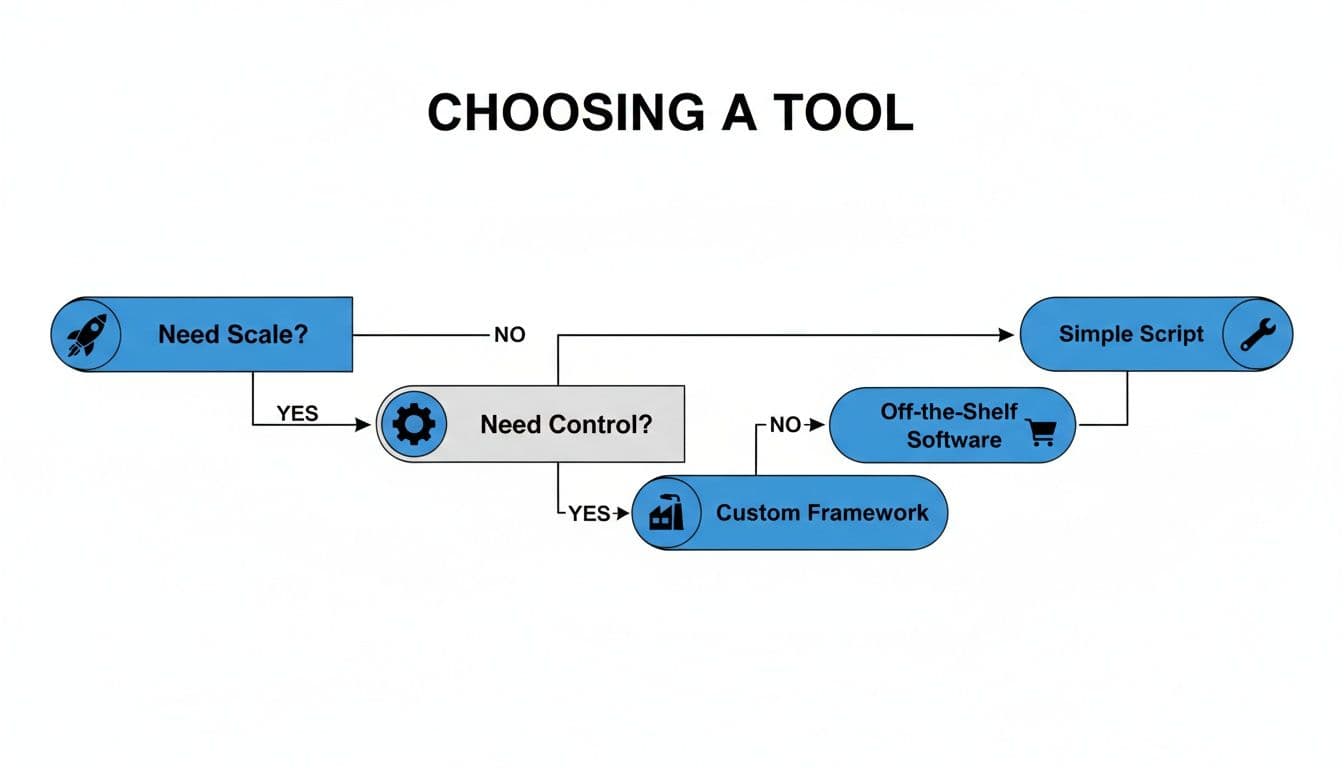
As you can see, teams that need to pump out content should lean toward AI, while those who need to fine-tune every detail are better off with traditional suites. Line up your software with your strategy, and you’ll give your team the right tools to win.
Frequently Asked Questions
When you're digging into video production software, a few key questions always seem to pop up. Here are some straightforward answers to the most common ones we hear.
Can AI Video Generators Replace Professional Video Editors?
Not really—they solve different problems. AI tools are built for speed and scale. They're perfect when you need to pump out a high volume of marketing assets, like turning a batch of product photos into a dozen different social media ads. They automate the tedious parts and give you a great-looking video in minutes.
A professional editing suite like Adobe Premiere Pro, on the other hand, gives you deep, granular control. It's what you need for a short film, a detailed brand commercial, or any high-concept project that requires custom work. For most marketing teams, AI generators don't replace editors; they free them up. They handle the repetitive ad creation, letting your creative pros focus on bigger, more strategic projects.
What Image Quality Do I Need for an AI Video Tool?
For the best results with any image-to-video platform, always start with high-resolution photos. The clearer and cleaner your source images are, the more polished and cinematic your final video will look. Think well-lit shots without a lot of blur or digital noise.
Key Takeaway: The better your input, the better your output. AI is an amplifier for your creative assets—it can only enhance what you give it.
Platforms like Proom AI are designed to work with standard web formats like JPEG and PNG. Since the templates and effects are made to elevate your photography, starting with quality material is the simplest way to guarantee a stunning final product.
How Does a Credit-Based Pricing Model Work?
A credit-based model, like the one Proom AI uses, is essentially a pay-as-you-go system for video creation. Instead of a flat monthly fee for unlimited access you might not use, you buy a pack of credits.
Each video you create uses up a certain number of those credits. This approach is incredibly cost-effective for teams whose video needs change from month to month. You only pay for what you actually produce, so you're not wasting money on an idle subscription during slower periods. It also scales beautifully—if a big campaign comes up, you just buy more credits.
Ready to see how fast you can turn your images into performance-driven video ads? Try Proom AI today and generate your first video in minutes. Create your free video now.
Ready to create video ads?
Turn your photos into scroll-stopping ads in minutes. No video editing skills required.
Try For Free

