How to Run a Facebook Ads Campaign That Actually Converts
Learn how to run a Facebook Ads campaign that drives real results. Our guide covers strategy, targeting, creative, and optimization with expert insights.
Running a Facebook Ads campaign isn't just about clicking "Launch." To get real results, you need a solid game plan before you even open Ads Manager. It's about connecting your actual business goals to every single choice you make on the platform, from the audience you target to the creative you show them.
Building Your Campaign Foundation Before You Spend
Jumping into Ads Manager without a plan is the fastest way to waste money. It’s like trying to build a house without a blueprint—you might end up with something, but it probably won’t be what you wanted, and it definitely won't be stable.
The very first question you need to answer is dead simple, yet it's the one most people skip: "What am I actually trying to achieve here?"
Are you trying to sell a specific product? Generate leads for a service? Get your name out there in a new city? Drive foot traffic to your physical store? Your answer changes everything. A campaign built to drive online sales will look completely different from one designed for brand awareness, and getting this wrong from the start is a recipe for failure.
Understanding the Meta Ads Structure
To bring your strategy to life, you have to get your head around how Meta organizes its campaigns. It’s a simple, three-level hierarchy that, once you get it, makes managing, testing, and scaling your ads so much easier.
-
Campaign: This is the top dog, the filing cabinet for your entire effort. At this level, you set one single advertising objective. For example, your campaign might be "Summer Sale Conversions."
-
Ad Set: This is where the magic happens. Inside a campaign, you have ad sets, which control your targeting, budget, schedule, and ad placements. You can have multiple ad sets targeting different groups. For instance, one ad set could go after new customers who love fashion, while another retargets people who’ve visited your website.
-
Ad: Finally, nested inside each ad set are your actual ads. This is the creative stuff your audience sees—the images, videos, headlines, and call-to-action buttons. You can run several different ads within one ad set to see which visuals or copy your audience responds to best.
This simple flow is incredibly powerful.
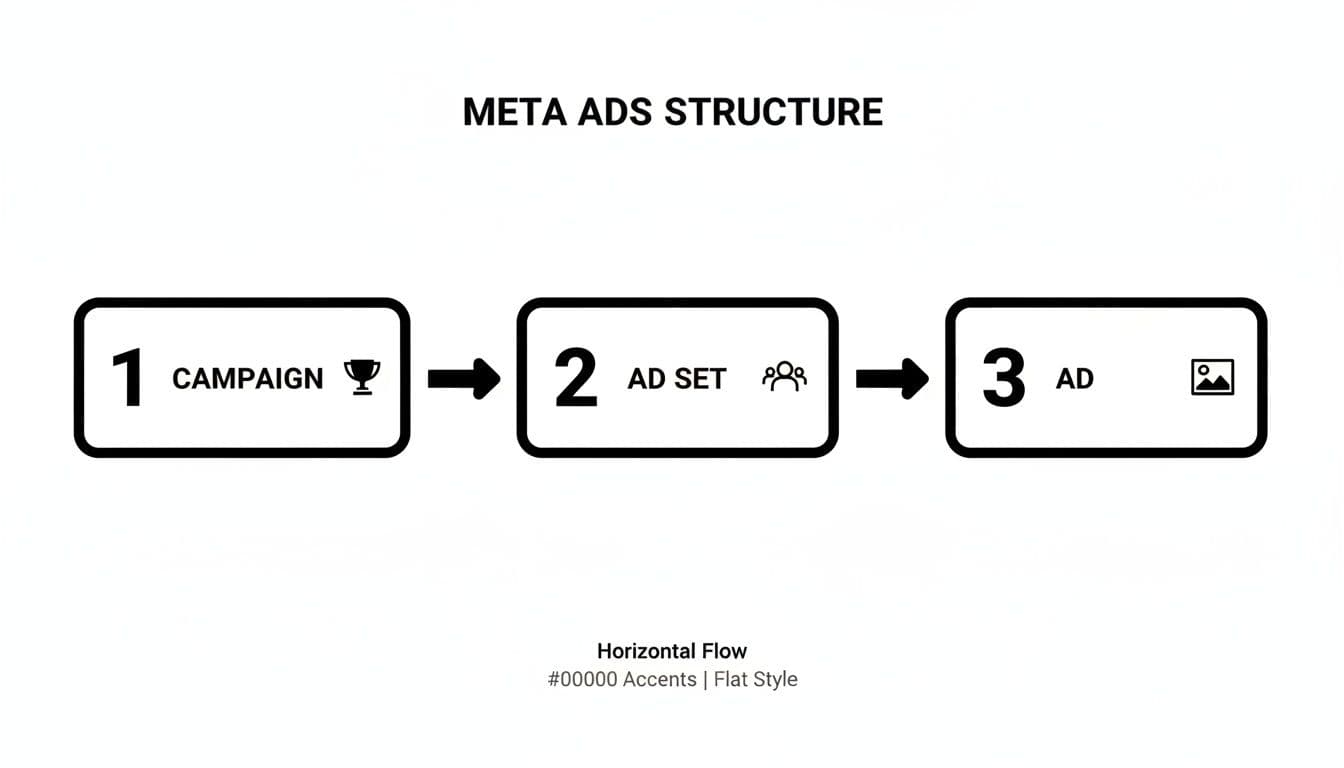
This structure ensures your big-picture goal (at the campaign level) is supported by the right audience (at the ad set level) and brought to life with compelling creative (at the ad level).
Mapping Your Goals to the Customer Journey
Think about where your potential customers are in their relationship with you. Are they total strangers who’ve never heard of your brand, or are they die-hard fans ready to buy again? Your advertising needs to meet them where they are.
The biggest mistake I see new advertisers make is asking for the sale on the first touch. It’s like proposing on a first date—it’s awkward, and it almost never works. You have to build a little trust first.
A great way to approach this is with the classic marketing funnel:
- Top of Funnel (Awareness): Your goal here is to introduce your brand to new people. Don't go for the hard sell. Your ads should be helpful, entertaining, or inspiring.
- Middle of Funnel (Consideration): Now you're building interest with people who know who you are. This is the place for ads that showcase product benefits, share customer testimonials, or offer a valuable freebie.
- Bottom of Funnel (Conversion): This is where you ask for the sale. These ads are for a warm audience—people who already know, like, and trust you.
By mapping your ads to these stages, you deliver the right message to the right person at the right time. And if you need help creating visuals for each stage, our guide on the best social media content creation tools has some great ideas to get you started.
Choosing the Right Objective and Budget Strategy
Your campaign objective is the single most important decision you'll make when setting up a Facebook ad. Think of it as giving the Meta algorithm its marching orders. It’s not just a category—it's a direct command telling Facebook exactly what result you want.
Get this wrong, and you could blow your budget on thousands of clicks from people who have zero intention of ever buying anything.
Let’s say you’re an e-commerce brand selling handmade leather wallets. Your first instinct might be to choose the "Traffic" objective. Makes sense, right? You want people on your product page. But the algorithm will do exactly what you told it to: find the cheapest clicks possible. This often means you get an audience of window shoppers who love to browse but never pull out their credit cards.
If you switch that objective to "Sales," you're telling the algorithm to be much more selective. It will actively hunt for users with a history of making online purchases, even if it means ignoring thousands of cheaper clicks. The cost per click might go up, but your return on ad spend will almost always be dramatically better because you're reaching people primed to buy.
Aligning Your Goal with the Right Objective
Every successful campaign I've ever run started with picking the right objective. Each one is designed for a specific stage of the customer journey, from first impression to final sale.
Here’s a quick rundown of the main players:
- Awareness: This is your top-of-funnel play. Use it when you just need to get your name out there and introduce your brand to a new audience. The algorithm will prioritize showing your ad to the maximum number of people for the lowest possible cost.
- Traffic: As the name implies, this one is all about sending people to a destination, like a blog post or your homepage. It's a great choice for building a retargeting audience or promoting content, but it's a poor choice if your main goal is getting sales.
- Leads: When you need to collect contact info—like email addresses or phone numbers—this is your go-to. It’s perfect for service-based businesses, webinar sign-ups, or anyone looking to grow their email list with high-intent prospects.
- Sales: This is the moneymaker. Use this when you want people to take a specific, valuable action on your site, like making a purchase or adding an item to their cart. The algorithm will be laser-focused on finding users most likely to convert.
To make this even clearer, here's a simple guide to help you match your marketing goal to the right Facebook ad objective.
Facebook Ad Objectives Quick Reference Guide
| Objective | Best For | Example Use Case |
|---|---|---|
| Awareness | Reaching a broad, new audience and building brand recognition. | A new local coffee shop wants to make sure everyone in a 5-mile radius knows they've opened. |
| Traffic | Driving visitors to a specific landing page, blog post, or app. | A marketing agency wants to drive traffic to a new case study to build a retargeting list of interested professionals. |
| Leads | Collecting contact information like emails or phone numbers. | A real estate agent wants to capture leads from people interested in a free home valuation guide. |
| Sales | Encouraging direct actions like purchases or app installs. | An e-commerce store wants to drive direct purchases of their new spring clothing line from a catalog ad. |
Choosing the right objective from this list is the first step toward a profitable campaign. It ensures you're telling Meta's algorithm to hunt for the right kind of people from day one.
Smart Budgeting: CBO vs. ABO
Once your objective is locked in, you need to decide how to spend your money. Meta gives you two ways to manage your budget: at the campaign level or at the ad set level.
Ad Set Budget Optimization (ABO): With ABO, you manually set a budget for each individual ad set. This gives you total control, which is exactly what you want when you're testing. You can give three different ad sets a $20 daily budget each—one targeting young professionals, another targeting college students, and a third targeting stay-at-home parents—to see which audience responds best without one hogging all the cash.
Campaign Budget Optimization (CBO): CBO operates at the campaign level. You set one overall budget, and Meta’s algorithm automatically shifts spending to the top-performing ad sets in real time. This is what you use when it's time to scale. Once you’ve used ABO to find your winning audiences and creatives, you bundle them into a CBO campaign and let the algorithm work its magic to get you the most results for your money.
A word of caution from experience: Don't jump from ABO to CBO too soon. Make sure you have clear, consistent winners from your testing phase. CBO is incredible for scaling what works, but it can easily waste your budget by feeding a "lucky" ad set if you haven't gathered enough data first.
To get the most out of your budget, you need a solid grasp of how much Facebook ads cost and what typical CPCs and CPMs look like in your industry. It’s a massive market—global social ad revenues are projected to hit $116.53 billion in 2025—so a data-backed budget is non-negotiable.
As a rule of thumb, a great starting goal is to aim for a 3:1 return on ad spend (ROAS), meaning you earn $3 for every $1 you spend.
Mastering Audience Targeting for Maximum Impact
A killer ad shown to the wrong people is just a waste of money. The real magic of Facebook ads isn't just flashy creative; it's the platform's uncanny ability to put your message in front of the exact people who need to see it. Getting this right is what separates a campaign that fizzles out from one that brings in a serious return.
Your first step is to get your head around the three pillars of Meta's audience targeting. Each has a specific job, and the best advertisers know how to blend them into a smart, cohesive strategy.

Unpacking Core Audiences
This is ground zero. Core Audiences are how you find new people who've never heard of you but are prime candidates for what you offer. You're building an audience from scratch based on a massive pool of attributes.
The options here are almost endless, letting you get hyper-specific.
- Demographics: This covers the basics like age, gender, and location, but also digs into life events. Think "newly engaged," "parents with toddlers," or "recently moved."
- Interests: Here's where you can tap into people's passions. Selling hiking gear? You can target users interested in "backpacking," "national parks," and even competitor brands.
- Behaviors: This is a powerful one. It lets you target based on online activities and purchase history, like "engaged shoppers" who have a history of clicking "Shop Now" buttons.
The scale is staggering. Facebook ads can now reach 2.28 billion people—that's 27.9% of the entire planet. To cut through that noise, you have to be precise. You can dig deeper into Facebook's global ad audience to see the full picture.
Leveraging Your Warmest Leads with Custom Audiences
If Core Audiences are for finding new faces, Custom Audiences are for reconnecting with people who already know your brand. These are your warmest leads, and they almost always deliver the highest return on your ad spend. It's the engine behind effective retargeting.
You can build these valuable audiences from several sources:
- Website Visitors: Using the Meta Pixel, you can group everyone who visited your site, looked at a specific product page, or even abandoned their shopping cart.
- Customer List: Got a list of emails or phone numbers? Upload it, and Meta will securely match them to user profiles. Perfect for upselling past buyers or targeting newsletter subscribers.
- App Activity: If you have an app, you can create audiences from actions like reaching a new level in a game or making an in-app purchase.
- Engagement: This is key. You can target people who have watched your videos, liked your Page, or interacted with your posts on Facebook or Instagram.
A pro tip from years in the trenches: For e-commerce, your "Add to Cart (14 days)" and "View Content (14 days)" Custom Audiences are absolute gold. These people were this close to buying. Hit them with a targeted ad showing the product again, maybe with a small discount, and watch the sales roll in.
Ready to create video ads?
Turn your photos into scroll-stopping ads in minutes. No video editing skills required.
Try For FreeScaling Your Success with Lookalike Audiences
Once you have a high-performing Custom Audience—say, your list of top customers—you can clone them with a Lookalike Audience. This is where Meta's algorithm really flexes its muscles. It analyzes the common traits, interests, and behaviors of your source audience and then finds millions of new users who are just like them.
For example, you can take your top 1,000 customers and ask Meta to create a Lookalike Audience of the top 1% of users in the United States who most closely match their profile. It’s the single most powerful way to scale your campaigns by reaching new, high-potential customers who look just like your existing fans.
Choosing Your Ad Placements Wisely
Finally, you need to decide where your ad shows up. Meta gives you two main options for placements:
- Advantage+ Placements (Automatic): This is the default and recommended setting. You let Meta's algorithm do the heavy lifting, showing your ads across Facebook, Instagram, Messenger, and the Audience Network wherever it will get you the best results for the lowest cost.
- Manual Placements: This gives you total control. You might choose this if your ad is a vertical video designed only for Instagram Stories and Reels, and you want to prevent it from showing up awkwardly in the Facebook feed.
For most advertisers, especially when you're starting out, just stick with Advantage+ Placements. The algorithm is incredibly smart and will often find high-performing spots you might have missed. Only switch to Manual Placements when you have a very specific, data-driven reason to limit where your ads appear.
Creating Ad Creative and Copy That Stops the Scroll
Let's be blunt: a brilliant targeting strategy means nothing if your ad looks like, well, an ad. In the endless scroll of social media, you have maybe three seconds to make someone stop. That's it. This is where your creative—the visuals and the words—has to do the heavy lifting.
And here’s the reality: everything you build has to be designed for a phone screen. Over 98% of Facebook users are on mobile. That means vertical formats like 9:16 for Stories and Reels aren't just a nice-to-have; they're the standard. Your visuals need to pop, your text has to be legible on a tiny screen, and your core message needs to hit immediately.
Designing Visuals That Capture Attention
Your ad’s image or video is the hook. Its only job is to earn you a few more seconds of someone's time. While a stunning static photo can work wonders for a beautiful product, video almost always wins.
But "video" doesn't have to mean a massive production budget. Honestly, some of the best-performing ads I've seen look like they were shot on a phone, because that user-generated style feels natural and authentic in the feed.
To make your visuals work, stick to these core principles:
- Hook them in the first 3 seconds. Don't bury the lead. Start with your most compelling shot, a surprising statement, or a question that makes them pause.
- Design for sound-off viewing. Most people are scrolling in public, at work, or late at night. Assume the sound is off. Use bold text overlays, captions, and strong visual storytelling to get your point across.
- Keep it short and punchy. For most ads, 15-30 seconds is the sweet spot. Get to the benefit, show your solution, and tell them what to do next.
The Power of AI in Video Ad Creation
For most businesses, the biggest roadblock to creating video ads isn't ideas—it's time, money, and technical skill. This is where AI tools are completely changing the game.
Platforms like Proom AI let you take a handful of product photos and spin them into a dynamic, engaging video ad in minutes. The workflow is dead simple: you upload your images, let an AI scriptwriter generate hooks and calls-to-action, and even add an AI voiceover if you need one.

This approach isn't just about saving time and money. It's about speed and iteration. You can create and test dozens of creative variations to quickly discover what actually gets your audience to click.
To get the most out of your video ads, make sure you're hitting all the key marks. Here’s a quick checklist I use to review every video before it goes live.
Video Ad Creative Checklist
| Element | Best Practice | Why It Matters |
|---|---|---|
| Opening Hook | Capture attention in the first 1-3 seconds with motion, a question, or a bold visual. | Stops the user from scrolling past your ad in a crowded feed. |
| Sound-Off Design | Use on-screen text, captions, and strong visuals. Assume no one has the audio on. | 85% of Facebook videos are watched without sound; your message must land visually. |
| Clear Value Prop | Show the problem you solve or the benefit you offer within the first 5 seconds. | Viewers lose interest fast. They need to know "what's in it for me?" right away. |
| Mobile-First Format | Use vertical (9:16 or 4:5) aspect ratios. Fill the screen. | Optimizes for the mobile viewing experience, making your ad more immersive. |
| Brand Presence | Subtly include your logo or brand colors within the first few seconds. | Builds brand recall even if the viewer doesn't click or watch the full video. |
| Clear CTA | End with a direct call-to-action (e.g., "Shop Now," "Learn More") on screen. | Tells the viewer exactly what to do next, reducing friction and boosting conversions. |
Following these guidelines ensures your video isn't just seen—it's understood and acted upon, even in a fast-paced, sound-off environment.
Writing Copy That Converts
Okay, your visual grabbed their attention. Now your words have to close the deal. Great ad copy isn’t about being clever for the sake of it. It’s about being clear, persuasive, and speaking directly to your ideal customer.
Every piece of copy in your ad has a job to do:
- The Headline: This is your billboard. It has to clearly state the biggest benefit or hook them with a powerful, curiosity-driving statement.
- Primary Text: Here's where you expand on the offer. Keep sentences short. Use bullet points or emojis to break up text and make it scannable. Focus on the outcome (the benefits), not just the specs (the features).
- Call-to-Action (CTA): Be direct and unambiguous. Use strong verbs like "Shop," "Download," "Claim," or "Learn." The text on your CTA button should perfectly match the action you want them to take.
The most effective ad copy I've ever written didn't sound like an ad at all. It sounded like a real person telling a story or solving a problem. Ditch the corporate jargon and write like you're talking to a friend.
If you're stuck, we've compiled a ton of powerful ad copy examples that have proven to work across dozens of different industries.
When you nail the combination of creative and copy, the results speak for themselves. The average Facebook ad conversion rate sits around 8.95%, but a campaign with compelling, optimized creative can easily see a 2-3x higher ROI. It's the single biggest lever you can pull to turn an average campaign into a great one.
Analyzing Performance and Optimizing for Growth
Hitting "publish" on your Facebook ad campaign isn't the finish line—it's the starting gun. The real work, the part that actually drives profit, begins now. This is where you obsessively watch what's happening and make smart, data-driven adjustments to separate a wasted budget from a high-return investment.
Before you spend a single dollar, your tracking has to be flawless. This starts with getting the Meta Pixel installed on your website. Think of this little piece of code as your eyes and ears, tracking every single action a user takes after they click your ad, from viewing a product all the way to completing a purchase.
But the Pixel alone isn't enough anymore. You absolutely must implement the Conversions API (CAPI). It works hand-in-hand with the Pixel, creating a more reliable server-to-server connection that feeds conversion data directly to Meta. This is your best defense against the data gaps caused by browser tracking updates, giving you a much truer picture of how your campaigns are actually performing.
Decoding the Metrics That Actually Matter
Once data starts pouring into Ads Manager, it's incredibly easy to get lost in a sea of numbers. Don't fall into that trap. You have to zero in on the metrics that directly reflect whether or not you're achieving your campaign goal. Drowning in vanity metrics like "Reach" or "Impressions" feels good, but it won't tell you if you're making money.
Do yourself a favor and build a custom report in Ads Manager that puts these KPIs front and center:
- Cost Per Result: This is your north star. It tells you exactly what you’re paying for the action that matters, whether it’s a lead, a sale, or an app install.
- Return On Ad Spend (ROAS): This is the ultimate measure of profitability, plain and simple. A 3x ROAS means you're generating $3 in revenue for every $1 you spend on ads.
- Link Click-Through Rate (CTR): This shows what percentage of people who saw your ad cared enough to click the link. A consistently low Link CTR (under 1%) is a huge red flag that your creative or copy just isn't connecting.
So many advertisers get hung up on metrics like Cost Per Click (CPC), but Cost Per Result is what truly moves the needle. I'd rather pay $5 for a click that leads to a $200 sale than $0.50 for a click from someone who just window-shops and bounces.
For a deeper look at how to evaluate your campaign’s financial health, it’s worth understanding the difference between ROI and ROAS. While ROAS is specific to your ad campaigns, ROI gives you the bigger picture of overall profitability.
Making Smart Optimization Decisions
Once you have clear data, you can start making moves. Proper optimization isn't about frantically tweaking things; it's a methodical process of finding your winners and killing your losers.
First, give any new campaign at least 3-5 days to get through its "Learning Phase" before you touch anything. Meta's algorithm needs stable conditions to gather data and figure out who to show your ads to. After that, it's game time.
- Scale the Winners: Found an ad set or an individual ad that’s crushing your target Cost Per Result with a killer ROAS? That’s a winner. Gently increase its budget by about 15-20% every few days to scale up without shocking the algorithm.
- Cut the Losers: Is an ad burning through cash—say, it's spent twice your target Cost Per Result—without a single conversion? Turn it off. Now. Every dollar it keeps spending is money down the drain.
- Troubleshoot the In-Betweens: What about an ad with a fantastic CTR but no conversions? The problem probably isn't the ad; it's what happens after the click. Check your landing page speed, your offer clarity, or your checkout process.
Your data tells a story. A high CTR with a low conversion rate means your ad is great, but your website is failing to close the deal. On the flip side, a low CTR means the ad creative itself needs a refresh. Knowing how to properly manage ads in Facebook is all about becoming a detective who can follow these clues.
The Power of Systematic A/B Testing
Finally, the best advertisers are relentless testers. A/B testing (or split testing) is how you turn good results into great ones. Instead of guessing what might work better, you let the data give you the answer.
The process is simple. Duplicate your best-performing ad set and change one single variable. This is the golden rule. If you change the headline, the image, and the audience all at once, you’ll have no clue which change actually made the difference.
Always start by testing the big, impactful stuff first:
- Audience: Pit a Lookalike Audience against a broad interest-based one.
- Creative: Test a compelling video ad against your best-performing static image.
- Offer: Run a "10% Off" discount against a "Free Shipping" promotion.
- Copy: Try a short, punchy headline versus a longer, more story-driven version.
By constantly testing, you build a library of proven winners. This disciplined approach is the only way to systematically lower your acquisition costs and improve your ROAS over the long haul. It's the foundation of sustainable growth with Facebook ads.
Answering Your Top Facebook Ads Questions
Even with the perfect strategy, running your first Facebook ad campaign is going to bring up questions. It's totally normal. Practical hurdles and confusing metrics can throw you off course if you don't know what to look for. Let's tackle some of the most common things that trip people up.
How Much Should I Spend on Facebook Ads When I’m Just Starting Out?
There's no magic number here, but a smart, safe starting point is $10-$20 per day for each ad set you're testing.
Forget about hitting it big in the first week. Your initial goal isn't to get rich; it's to buy data. You’re paying to learn what works. This kind of modest budget is just enough for Meta's algorithm to do its thing and gather performance data without you betting the farm on an unproven idea.
Use this time to pit different audiences and creatives against each other. Once a clear winner emerges—maybe an ad set with a positive ROAS or a consistently low cost per lead—that’s when you can confidently start bumping up the budget.
Why Are My Facebook Ads Getting Rejected?
Ad rejections are frustrating, but they're a normal part of the game. Don't panic. It almost always boils down to a handful of common issues.
The number one reason is a violation of Meta's Advertising Policies. This could be anything from making over-the-top claims ("Lose 30 lbs in 30 days!") to using banned content or targeting people based on sensitive personal traits.
Another big one is your landing page. Facebook looks at the entire user journey. If your landing page is broken, takes forever to load, or has nothing to do with what your ad promised, they'll shut it down.
Always check the specific rejection reason Facebook gives you. Then, pull up their official ad policies and put your ad and landing page under the microscope. A few tweaks and a resubmit usually does the trick.
How Long Should I Run an Ad Before Touching Anything?
Patience is probably the hardest part of advertising. You have to give new ads at least 3-5 days before you make any big decisions. This gives the campaign time to get through the crucial "Learning Phase," where Meta's algorithm is frantically testing and figuring out the best way to deliver your ad.
If you jump the gun and start changing the budget or swapping out the creative, you can reset this learning process and send your performance right back to square one. After about five days, you'll have enough solid data to look at metrics like CTR and your cost per result.
But don't be too patient. If an ad is a total dud after a week with zero signs of life (like you've spent double your target CPA with no conversions), it's time to pull the plug. Pause it and test something new. Don't let a failing ad bleed your budget dry.
This waiting period ensures your decisions are based on real data, not just a weird Tuesday.
What Is the Difference Between CTR (All) and Link CTR?
This one trips up a lot of new advertisers, and it's a critical distinction. Getting this wrong means you might think an ad is a winner when it's actually a flop.
-
CTR (All): This counts clicks on anything on your ad. A like, a comment, a share, a click to your Facebook Page, even someone clicking the "see more..." text. It really just measures overall engagement.
-
CTR (Link Click-Through Rate): This is the one that really matters for most campaigns. It only tracks clicks on the specific link that takes people to your website, product page, or landing page.
If your goal is to drive traffic, leads, or sales, Link CTR is your north star. A high "CTR (All)" with a pitiful "Link CTR" is a huge red flag. It means people find your ad interesting enough to interact with, but they have zero interest in actually visiting your site. That's a clear signal that your offer or your call-to-action isn't hitting the mark.
Ready to create scroll-stopping video ads without the headache? Proom AI turns your product photos into professional-grade video ads in minutes. Generate scripts, add voiceovers, and produce dozens of creative variations to find what truly converts. Start creating faster and smarter by visiting https://proom.ai to begin your free trial.
Ready to create video ads?
Turn your photos into scroll-stopping ads in minutes. No video editing skills required.
Try For Free

