A Practical Guide to Manage Ads in Facebook for Maximum ROI
Learn how to effectively manage ads in Facebook with our expert guide. Discover proven strategies for campaign setup, targeting, creative, and optimization.
If you want to get anywhere with Facebook ads, you have to get comfortable inside Meta Ads Manager. This isn't just about clicking buttons; it's about understanding how to set up your Business Suite correctly, get the Meta Pixel tracking properly, and build your campaigns in a way that makes sense from day one.
Honestly, the entire process lives or dies on the foundation you build before spending a single dollar.
Setting Up Your Facebook Ads Manager for Success
Before you even think about launching a campaign, you need a strategic setup. Think of it as laying the foundation for a skyscraper—any cracks you leave now will turn into massive problems down the road. This isn't just about ticking boxes. It's about creating an organized, scalable, and data-rich environment that powers every ad you run. A sloppy setup is a one-way ticket to messy data, wasted ad spend, and a whole lot of frustration.
Your first move is to establish a clean hierarchy within the Meta Business Suite. This is your central hub where you'll connect your Facebook Page, your Instagram profile, and create your Ad Account. If you work with a team or an agency, this is also where you’ll carefully assign roles and permissions to make sure everyone has the access they need without compromising security.
Core Tracking and Verification
Once your accounts are linked, the most critical job is getting your data tracking right. Without clean, accurate data, you’re flying blind.
This all starts with installing the Meta Pixel on your website. The Pixel is a small snippet of code that acts as your eyes and ears, tracking what visitors do—things like viewing a page, adding an item to their cart, or making a purchase. This information is absolutely essential for measuring how well your campaigns are working, building powerful retargeting audiences, and teaching Facebook's algorithm to find more people like your best customers.
To really dial in your data accuracy and fight back against signal loss from things like browser updates and ad blockers, you also need to get familiar with the Meta Conversion API. It creates a more stable, direct link between your website's server and Meta's, letting you capture important events that the Pixel might miss.
Another step you absolutely cannot skip is domain verification. This simply proves to Facebook that you own your website. It’s required if you want to configure and prioritize up to eight conversion events for campaign optimization, which is fundamental for tracking e-commerce success.
Why is all this initial grunt work so important? Because the scale of this platform is staggering. Facebook ads can reach 2.28 billion users worldwide, making it the second-largest social ad platform on the planet. Its reach grew by 4.3% in the last year alone, which is why over 90% of marketers depend on it to connect with a huge slice of the world's adult internet users.
Building a Scalable Foundation
A well-structured Ads Manager is built for growth. As your business expands, you might add new product lines, target different countries, or bring on more team members. A clean initial setup ensures you can scale your advertising efforts without tearing everything down and starting over.
When you do it right from the beginning, your data stays consistent, your audiences are clearly defined, and your reporting is always reliable. That’s what sets the stage for long-term, profitable advertising.
To help you get started, here's a quick-reference table summarizing the critical elements for a robust and effective Facebook Ads foundation.
Core Components for a Scalable Facebook Ads Setup
| Component | Key Action | Strategic Importance |
|---|---|---|
| Meta Business Suite | Link your FB Page, IG Profile, and create an Ad Account. Assign team roles. | Centralizes all your assets and provides secure, role-based access for your team or agency. |
| Meta Pixel | Install the Pixel base code and set up standard events on your website. | Tracks user actions, measures conversions, and feeds the algorithm data to optimize campaigns. |
| Conversion API (CAPI) | Implement server-side tracking to supplement the browser-based Pixel. | Creates a more reliable data connection, capturing events lost due to browser restrictions. |
| Domain Verification | Verify your website domain within Business Manager. | Unlocks the ability to configure and prioritize up to 8 key conversion events for optimization. |
Getting these four pillars in place isn't just busywork—it's the strategic groundwork that separates the campaigns that succeed from those that fizzle out. Take the time to get this right, and you'll be in a much stronger position to scale.
Structuring Your Campaigns for Clarity and Performance
Let’s be honest: a messy ad account is a fast track to burning cash. If you can't make sense of your own data, you can't make smart decisions. To really manage ads effectively on Facebook, you need a disciplined structure. Think of it like a filing cabinet—without clear labels, you’re just shoving papers into drawers and hoping for the best.
The entire system is built on a simple three-level hierarchy: Campaign, Ad Set, and Ad. Getting this right from the start is non-negotiable for success.
The Campaign sits at the very top. This is where you set one single, overarching goal. It's your "why." Are you trying to get your name out there? Drive clicks to a new blog post? Or are you hunting for e-commerce sales? Each objective tells Facebook’s algorithm what you're trying to accomplish, so it can optimize accordingly.
From Broad Goals to Specific Actions
Nested under each Campaign, you’ll have one or more Ad Sets. This is the "who" and "how" of your strategy. This is where you define your audience, placements (like Instagram Stories vs. Facebook Feed), your budget, and the run dates.
And you can get incredibly specific here. For example, you might run one ad set targeting a lookalike audience of your best customers and another one targeting people based on interests like "interior design." Segmenting like this is crucial because it tells you exactly which groups of people are responding to your ads.
Finally, at the bottom, you have the Ads. This is the "what"—the actual video, image, and copy your audience sees. An ad set can hold multiple ads, which is perfect for testing different creative approaches to see what hits home.
Key Takeaway: This disciplined structure isn't just about being tidy. It lets you isolate variables, test effectively, and put your money where it works best. When an ad set bombs, you know exactly which audience or placement is the problem, instead of fumbling in the dark.
This visual shows how your high-level business assets should flow down to the nitty-gritty tracking components that make your campaigns work.
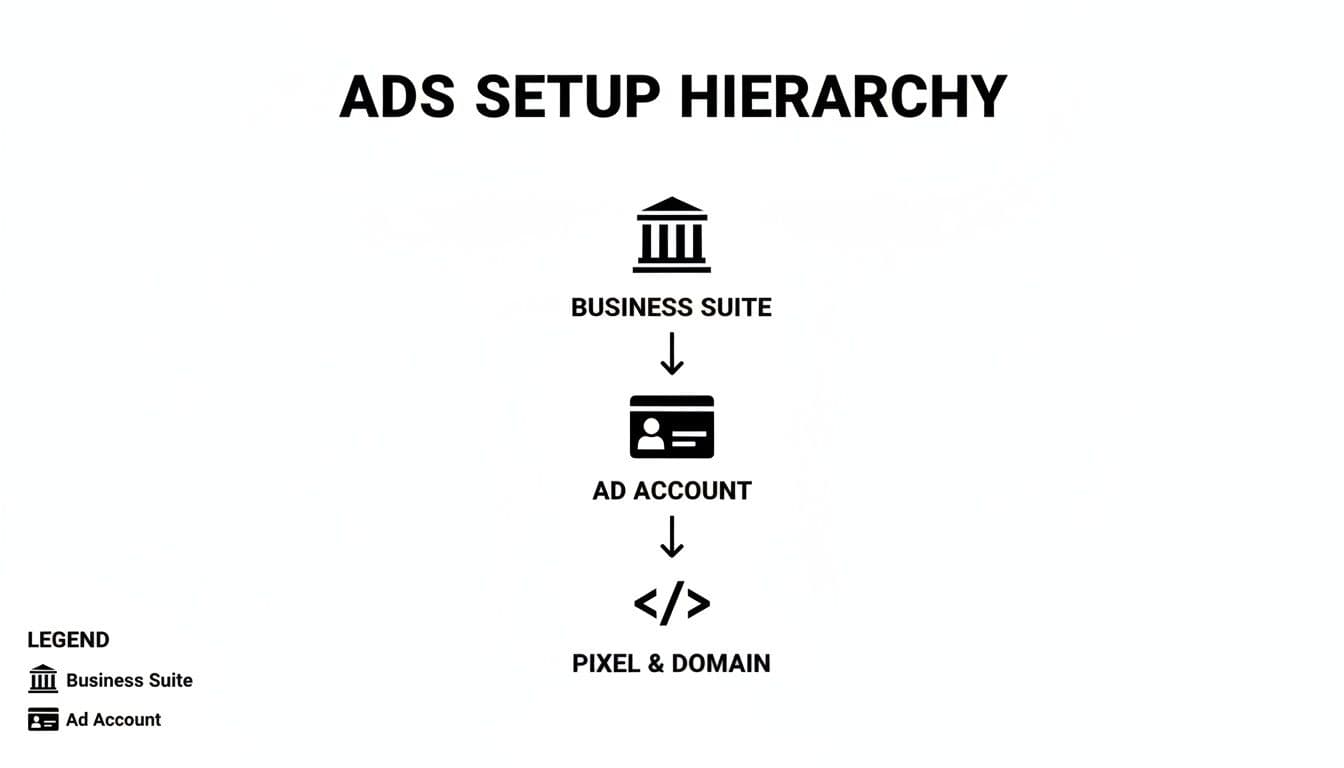
This setup ensures every dollar you spend is tied to a clear business goal and tracked with the right data sources.
Aligning Campaigns with the Marketing Funnel
One of the most powerful ways I've seen teams organize their accounts is by mapping campaigns to the classic marketing funnel: Top of Funnel (TOFU), Middle of Funnel (MOFU), and Bottom of Funnel (BOFU). It’s a simple framework that makes sure you’re saying the right thing to the right person.
-
TOFU (Top of Funnel) Campaigns: This is all about introducing yourself to cold audiences—people who have no idea who you are.
- Objective: Awareness or Traffic.
- Audiences: Broad targeting based on interests or demographics.
- Creative: Think educational content, brand stories, or engaging videos that solve a problem without a hard sell.
-
MOFU (Middle of Funnel) Campaigns: Here, you're warming up people who've shown a flicker of interest. They know you exist, but they're not ready to buy yet.
- Objective: Engagement or Lead Generation.
- Audiences: People who’ve watched your videos, engaged with your posts, or visited your website.
- Creative: Offer them something of value, like a case study, a webinar sign-up, or a helpful guide.
-
BOFU (Bottom of Funnel) Campaigns: Now we're talking to hot prospects. These are the people ready to pull out their wallets.
- Objective: Conversions or Catalog Sales.
- Audiences: Retargeting website visitors who added a product to their cart or started the checkout process.
- Creative: Hit them with direct offers. Think dynamic product ads, glowing customer testimonials, and a clear "Shop Now" call-to-action.
When you structure your account this way, you create a logical path that guides people from "who are you?" to "take my money!" It brings incredible clarity, making it easy to see which part of your funnel needs more budget or better creative. This isn't just organization; it's how you turn a chaotic ad account into a predictable growth machine.
Mastering Audience Targeting to Find Your Ideal Customers
Your video ad can be a masterpiece and your budget generous, but if you're showing it to the wrong people, you’re just burning cash. Getting a real return from your Facebook ads all comes down to mastering audience targeting. This is where you stop shouting into the void and start having a real conversation with someone who actually wants to listen.
It all starts with knowing who you're talking to. Before you even open Ads Manager, you should have a crystal-clear picture of your ideal customer. If you haven't already, take the time for creating effective buyer personas. This groundwork makes every single targeting decision you make later on infinitely more powerful.
Unlocking Core Audiences
Core Audiences are your go-to for reaching new people. This is where you build an audience from the ground up using a mix of demographics, locations, interests, and behaviors. The real magic isn't in picking one or two broad interests, though. It’s in layering them to create a super-specific profile.
Let's say you're a real estate agent. Instead of just targeting "Real Estate," you can stack interests and behaviors to find a much more motivated group.
- Start with an Interest: People interested in Zillow or Realtor.com.
- Layer a Behavior: Then, narrow it down so they must also match the behavior Likely to Move.
- Add a Demographic Filter: Finally, make sure they are between the ages of 30-45.
Suddenly, you’ve filtered out the casual browsers and are zeroing in on a segment with genuine intent. This is how you stop wasting money and start targeting prospects who matter.
Harnessing the Power of Custom Audiences
While Core Audiences are for finding new faces, Custom Audiences are for reconnecting with people who already know you. These are your warm leads—people who have interacted with your business before, making them way more likely to convert. Honestly, this is probably the most valuable tool in your entire targeting toolkit.
You can create these high-value audiences from a few key sources:
- Website Visitors: Using data from your Meta Pixel, you can target anyone who visited your site in the last 30, 60, or even 180 days. Get even more granular by targeting people who viewed a specific product but didn't add it to their cart.
- Customer Lists: Got an email list? Upload it. Facebook will securely match those emails to user profiles, letting you serve ads directly to existing customers or subscribers. It's perfect for loyalty campaigns or promoting new products.
- Engagement: You can build audiences from people who’ve liked a post on your Facebook Page, watched 75% of one of your videos, or followed your Instagram profile.
These audiences are pure gold for your bottom-of-funnel campaigns where you can hit them with direct offers, testimonials, or cart abandonment reminders. As you're putting together these retargeting ads, remember that your copy is just as critical as your visuals. If you need some ideas, check out our guide on ad copy examples.
Pro Tip: Always, always exclude recent buyers from your prospecting and general retargeting campaigns. Nothing annoys a new customer more than seeing an ad for the product they just bought. It’s a waste of money and just a bad look.
Ready to create video ads?
Turn your photos into scroll-stopping ads in minutes. No video editing skills required.
Try For FreeScaling Your Success with Lookalike Audiences
So, you’ve found a Custom Audience that’s converting like crazy. Now what? It's time to scale. Lookalike Audiences are Facebook’s secret weapon for finding new people who share the same traits as your best customers. You give Facebook a source audience, and its algorithm goes to work analyzing thousands of data points to build a brand new, much larger audience of similar users.
The key here is the quality of your source audience. Garbage in, garbage out. A Lookalike built from a list of 1,000 of your highest lifetime value customers will blow a Lookalike based on 100,000 general website visitors out of the water every single time.
Always start with a 1% Lookalike. This audience is the most tightly matched to your source. As you get more budget and want to expand, you can test broader audiences at 2%, 5%, or even 10%. You can even refine these Lookalikes by layering them with a broad interest, giving you a powerful mix of algorithmic precision and your own strategic control.
Creating Video Ads That Stop the Scroll and Drive Action
Great targeting gets your ad in front of the right people, but your creative is what actually makes them stop and listen. Think about it: in a feed where users flick past dozens of posts every minute, a static image just doesn't cut it anymore. Video isn't just an option; it's the only real way to command attention.
And here's the good news: creating compelling video ads doesn't require a Hollywood budget. You just need to get the fundamentals right.
The key is to think mobile-first from the absolute start. That means designing for a vertical screen (9:16 aspect ratio for Reels or Stories) and assuming your audience is watching with the sound off. Adding clear, bold captions isn't a nice-to-have; it's a non-negotiable part of making sure your message lands.
The First Three Seconds Are Everything
You have a tiny, tiny window to make an impact. If you don’t grab someone's attention in the first few frames, they’re gone. Your video's opening moments must deliver a powerful hook that physically stops their thumb from moving.
This could be:
- A Provocative Question: "Tired of wasting money on ads that don't convert?"
- A Surprising Visual: A quick camera pan, a dramatic transition, or something unexpected.
- A Bold Statement: "This is the last design tool you'll ever need."
The goal is to spark instant curiosity or hit a pain point head-on. Don't waste time with slow fades or floating logos. Jump straight into the action and give them a reason to stick around. That initial hook is easily the most important piece of your video creative.
Once you’ve got them hooked, the rest of the video should tell a quick, compelling story. It doesn't need to be complicated. A simple problem-solution narrative is a classic for a reason—it works. Show the "before" state (the struggle), introduce your product as the hero (the solution), and then show the "after" state (the amazing result).
Crafting a Clear and Compelling Call to Action
Every ad needs a job to do. After you've hooked the viewer and presented your solution, you must tell them exactly what to do next. A vague or missing Call-to-Action (CTA) is just a recipe for wasted ad spend.
Your CTA needs to be direct, clear, and perfectly aligned with your campaign goal. Whether it's "Shop Now," "Learn More," or "Sign Up," make it impossible to misunderstand. I always recommend reinforcing your button's CTA with a verbal or text-based callout in the final seconds of your video—it really helps drive the point home.
A strong creative directly impacts your bottom line. Effective video ads can significantly boost key performance metrics. Vertical video ads with a voiceover, for instance, can deliver 3% higher conversions per dollar spent. For e-commerce brands, a well-crafted ad can push click-through rates past 4%, and when combined with lead generation goals, video can improve conversion rates by up to 20%. Learn more about these powerful Facebook ad statistics.
Streamlining Your Video Ad Production
For small teams or solo entrepreneurs, the idea of producing a steady stream of high-quality video ads can feel completely overwhelming. But here's the thing: modern tools have made this process so much more accessible. You no longer need complex editing software or a film degree to get professional results.
Platforms now exist that can turn a simple set of still images—like product photos or project pictures—into a dynamic, cinematic video ad in just a few minutes. You can cycle through different templates, add AI-generated voiceovers, and even get help writing compelling ad copy right inside the tool. This is a total game-changer for staying agile. Check out our guide on how to create video ads for a deeper look into this streamlined workflow.
By focusing on these core principles—a strong hook, a clear story, a compelling CTA, and efficient production—you can create video ads that not only stop the scroll but also drive real, meaningful action for your business.
Optimizing Your Budget and Bidding Strategy
Smartly managing your ad spend is what separates profitable campaigns from costly experiments. Once your targeting is dialed in and your creative is ready, the next step is to tell Facebook how much you’re willing to spend and how you want it to pursue your goals. Getting this right is a crucial part of how you manage ads in Facebook for long-term success.
This isn’t about setting a budget and forgetting it. It’s an ongoing cycle of allocating funds, choosing the right bidding strategy, and making data-driven tweaks to maximize your return on ad spend (ROAS).
Campaign Budget Optimization vs Ad Set Budgeting
Your first big decision is where to set your budget. Facebook gives you two primary options, and knowing when to use each is key.
-
Ad Set Budgeting (ABO): This is the old-school method where you set a specific daily or lifetime budget for each ad set. This approach gives you granular control, which is perfect for testing. For instance, if you absolutely need to guarantee a $20/day spend on your lookalike audience and a $10/day spend on your interest-based audience, ABO is the way to go. You’re telling Facebook exactly how to spend every dollar.
-
Campaign Budget Optimization (CBO): With CBO, you set one overarching budget at the campaign level. Facebook’s algorithm then automatically distributes that budget in real-time to the best-performing ad sets. If your lookalike audience starts bringing in sales at a lower cost, Facebook will intelligently funnel more of the total budget there.
CBO is incredibly powerful for scaling winning campaigns because it lets the algorithm do the heavy lifting for you. However, I almost always stick with ABO during the initial testing phase when I need to force-spend on new audiences to gather enough data.
Choosing the Right Bidding Strategy
Your bidding strategy tells Facebook what to prioritize when spending your money. This choice absolutely must align with your campaign objective. Trying to get the cheapest clicks when your goal is sales is just a recipe for low-quality traffic that never converts.
Here are the most common strategies you'll run into:
-
Highest Volume: This tells Facebook to get you the most possible results (like purchases or leads) for your budget. It’s a fantastic default option for most campaigns because it focuses on pure efficiency.
-
Cost Per Result Goal: Here, you tell Facebook the average cost you’re willing to stomach for a result. For example, if you know a lead is worth $15 to your business, you can set that as your goal. This helps protect your profit margins, but it can choke your delivery if your goal is unrealistically low.
-
ROAS Goal (Return on Ad Spend): For e-commerce stores, this is the holy grail. You can set a minimum ROAS target, like 2x or 3x, and Facebook will only show your ads to people it believes are likely to hit that threshold.
-
Highest Value: This strategy shifts the focus from the number of purchases to the total value of those purchases. It tells Facebook to find customers who are likely to spend more, which can be a game-changer for businesses with a wide range of product prices.
Key Insight: Don't be afraid to let the algorithm work its magic. For most advertisers, starting with "Highest Volume" is the safest and often most effective bet. It allows Facebook's machine learning to find the lowest-cost opportunities first. Once you have solid performance data, you can start experimenting with more restrictive bids like a Cost Per Result Goal.
A Simple Workflow for Ongoing Optimization
Budget management isn't a one-and-done setup. It’s a continuous loop of monitoring, analyzing, and adjusting.
- Monitor Performance Daily: Check your key metrics every single day. Are your costs stable? Is your ROAS hitting its target? Catching problems early is everything.
- Identify the Underperformers: After a few days, it will become obvious which ads or ad sets aren't pulling their weight. An ad with a high Cost Per Click (CPC) and zero conversions is just burning cash.
- Make Small, Decisive Changes: When you spot a loser, turn it off. If one ad set is driving all your results, consider moving it to its own CBO campaign to scale. The key is to avoid making drastic budget changes, as this can shock the system and reset the algorithm's learning phase. Gradual increases of 15-20% every few days are much safer.
- Always Be Testing: Your best-performing ad today will eventually get stale. You should constantly be testing new creatives, headlines, and audiences to find your next winner.
This systematic approach transforms budget management from a guessing game into a predictable process for improving profitability. And if you're looking to speed up that creative testing cycle, it's worth exploring tools that can help you generate AI-powered Facebook ads in a fraction of the time.
Untangling Common Facebook Ad Knots
Even the pros have those moments. You’re staring at Ads Manager, your brilliant campaign is live, and… nothing. Crickets. Or maybe the numbers just don't make sense. It’s a rite of passage for every advertiser, and knowing how to diagnose the problem without hitting the panic button is what separates the novices from the veterans.
Let's walk through some of the most common tripwires and how to get your campaigns back on track, fast. Think of this as your field guide to Facebook ad first aid.
"My Facebook Ads Aren't Delivering! What Gives?"
There’s nothing more frustrating than launching a campaign only to see it stuck at zero impressions. When your ads flatline right out of the gate, it's almost always one of a few usual suspects. Before you tear it all down and start over, run through this quick diagnostic.
First, the obvious stuff. Pop into Ads Manager and make sure the campaign, ad set, and ad are all toggled on. You'd be surprised how often this is the culprit. While you're there, check for any big red "Disapproved" flags. Facebook's approval bots can be finicky, so always review the reason for any rejections.
If the basics check out, it's time to dig a little deeper. The issue is likely hiding in one of these three spots:
- Your Audience is Too Small: If you've layered on targeting until your potential reach is tiny, the algorithm might just give up trying to find people. An audience under 100,000 can struggle to get off the ground, especially with a conservative budget. Try loosening the reins a bit—add another interest or broaden the age range.
- Your Bid or Budget is Too Low: You're in an auction, and if your budget is too small, you'll get outbid every time. A $5 per day budget in a competitive industry just isn't enough for the algorithm to gather the data it needs to start delivering your ad effectively.
- Your Ad is Stale: Have you been running this same creative for weeks? Check your frequency metric. If it’s creeping up, it means the same people are seeing your ad over and over, and they’ve started tuning it out. Performance plummets, and Facebook's algorithm throttles delivery. That’s your cue to swap in fresh creative.
Which Metrics Actually Matter? (Hint: It Depends)
Opening Ads Manager can feel like stepping into the cockpit of a 747—buttons and dials everywhere. The secret isn’t knowing what every single metric means, but knowing which three or four matter for your specific goal.
The single most important skill you can develop is tying your analysis directly back to the campaign objective you chose. This is how you stop chasing vanity metrics and start optimizing for actual business results.
Don't get hypnotized by a sky-high Click-Through Rate (CTR) on a sales campaign if it's not actually generating any purchases. A great CTR with zero conversions just means you're really good at getting clicks, not at making money.
Here's a simple way to think about it:
| Campaign Objective | What to Watch | Why It Matters |
|---|---|---|
| Awareness | Reach, Impressions, Frequency | How many unique people saw your ad and how often. |
| Traffic | Link Clicks, CTR, Cost Per Click (CPC) | How efficiently you're sending people to your landing page. |
| Conversions | Cost Per Result (CPA), Conversions, ROAS | Your real cost to get a customer and what you're getting back. |
What's This "Learning Phase" and Why Should I Care?
Ever see that little "Learning" status on a new ad set? Pay attention to it. This is a critical window where Facebook's algorithm is on a mission, testing thousands of variables to figure out who is most likely to take the action you want. It’s figuring out the perfect combo of placement, time of day, and user profile to deliver your ad to.
Performance will be choppy during this phase. Your Cost Per Result might jump around like crazy. That's totally normal. To officially exit the learning phase, an ad set needs to hit about 50 optimization events (like 50 purchases or leads) within a 7-day period.
The golden rule here is simple: leave it alone. Every time you make a significant edit—changing the targeting, creative, or budget—you reset the learning process. The algorithm has to start its homework all over again. Patience is your best friend here. Let the system do its job, and you'll be rewarded with more stable, predictable results down the line.
How Do I Properly A/B Test My Ads?
Guessing is the most expensive marketing strategy. The only reliable way to improve your results over time is through methodical A/B testing. And the most important rule of testing is to only change one thing at a time. If you test a new headline, a new image, and a new audience all at once, you’ll have no clue which change actually made the difference.
Your best bet is to use Facebook's own A/B Test tool, which you can set up at the campaign level. It does the heavy lifting for you, ensuring a clean split of your audience and giving you a statistically sound winner.
Not sure where to start? Here are a few high-impact variables worth testing:
- Creative: Pit your best video against a killer static image. Or, test two different hooks in the first 3 seconds of your video ad.
- Audience: Run a 1% Lookalike audience head-to-head against your best interest-based audience to see which one delivers a lower Cost Per Acquisition.
- Copy: Test a headline that focuses on a pain point versus one that highlights a benefit.
- Call-to-Action: Is "Shop Now" better than "Learn More" for your offer? There's only one way to find out.
Let each test run long enough to get meaningful data before you call it. This disciplined approach is how you turn good campaigns into truly great ones.
Ready to stop guessing and start creating video ads that perform? With Proom AI, you can turn your existing photos into professional, scroll-stopping video ads in just minutes. Our industry-specific templates and AI-powered scriptwriting tools make it easy for any marketer or small team to produce high-quality creative at scale. Start your free trial at Proom AI and see how easy it can be.
Ready to create video ads?
Turn your photos into scroll-stopping ads in minutes. No video editing skills required.
Try For Free

